The short answer
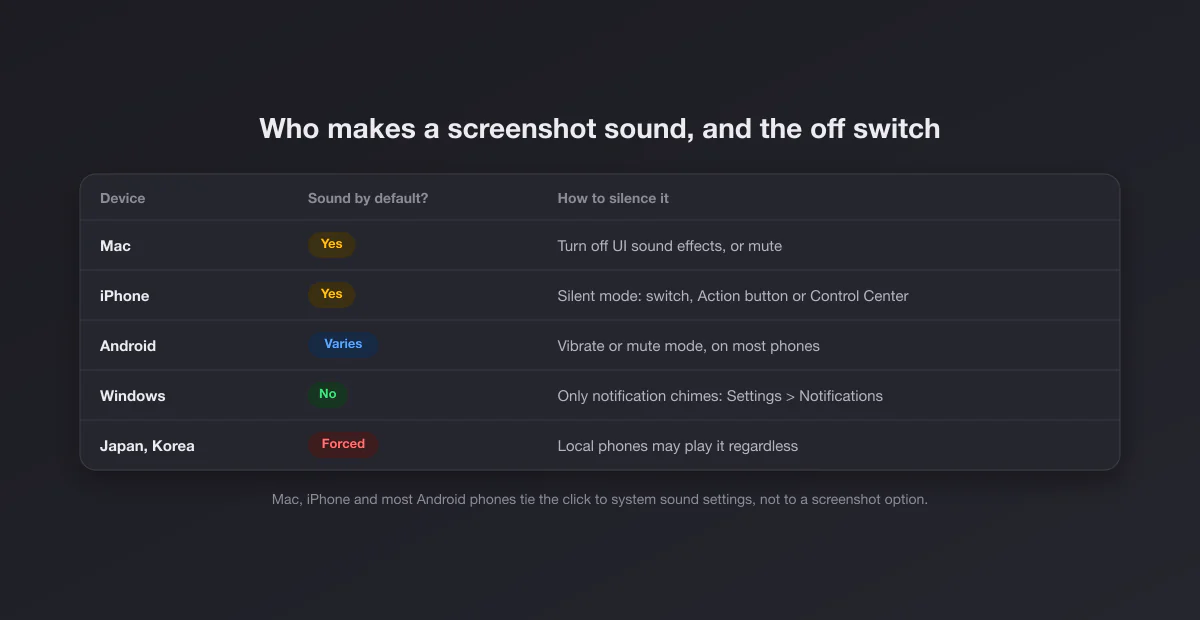
| Device | Makes a sound? | Quickest way to silence it |
|---|---|---|
| Mac | Yes | System Settings > Sound > turn off Play user interface sound effects |
| iPhone | Yes | Turn on Silent mode (switch, Action button or Control Center) |
| Android | Depends on the brand | Put the phone on vibrate or mute; some models have their own toggle |
| Windows | No, by default | Only the notification chime: Settings > System > Notifications |
Mac: the sound belongs to "user interface sound effects"
macOS has no option called "screenshot sound". The click is part of the interface sound effects, the same group as the sound of emptying the Trash or dropping a file in the Dock. To silence it without muting everything else:
- Open System Settings from the Apple menu.
- Go to Sound.
- Under Sound Effects, turn off Play user interface sound effects.
Music, video calls and alerts keep their sound; only the interface noises go quiet, screenshot included. On older versions of macOS the same checkbox lives in System Preferences > Sound > Sound Effects.
Two blunter options also work. Muting the Mac with the mute key silences the click along with everything else. And if you use headphones, the click plays through them, which in a quiet room is effectively silent.
What does not work: lowering the alert volume slider to zero helps on some versions and not on others, because the screenshot sound is not strictly an "alert". The interface sound effects switch is the reliable one.
The screenshot sound also plays when you capture with Shift + Command + 5; the same switch silences both. If you are still learning the shortcuts, our Mac screenshot shortcuts page lists every combination, and how to screenshot on a Mac covers the toolbar.
iPhone: Silent mode, and nothing else
On an iPhone the screenshot click follows the ringer. When the phone is in Silent mode, screenshots are silent. There is no separate screenshot switch in Settings. How you turn on Silent mode depends on the model:
| iPhone | How to turn on Silent mode |
|---|---|
| iPhone 15 Pro and later models with an Action button | Press and hold the Action button (its default action), or use the Silent mode control in Control Center |
| Models with the Ring/Silent switch | Flip the switch on the side so it shows orange |
| Any model on a recent iOS | The Silent mode button in Control Center, if you added it |
Apple describes the Action button and the Ring/Silent switch in its support article Use the Action button, side button, and other controls on your iPhone. Silent mode also mutes ringtones and alerts but keeps alarms, so if you only want quiet screenshots for a moment, flip it on, capture, and flip it back.
Turning the volume down with the side buttons is not the same thing. The volume buttons control media and, depending on your settings, the ringer level; the screenshot sound can still play at a low volume. Silent mode is the switch that actually removes it.
Screen recordings started from Control Center do not make a click, but the microphone can record surrounding sound if you long press the record button and turn the microphone on. Check that before recording somewhere quiet.
Android: it depends on who made your phone
Android itself leaves the screenshot sound to the manufacturer, so the answer varies.
- Vibrate or mute works almost everywhere. On most phones, switching to vibrate or silent with the volume buttons, or from the quick settings panel, also silences screenshots. Start here.
- Samsung Galaxy. The screenshot sound follows the system sound settings, so vibrate or mute mode silences it. Some One UI versions expose system sound controls under Settings > Sounds and vibration, where lowering system sounds helps too. The exact menu names change between One UI versions.
- Google Pixel. Screenshots on Pixel phones are usually silent already, with a short animation instead of a shutter. If yours makes a sound, vibrate mode silences it.
- Other brands (Xiaomi, OnePlus, Oppo, Motorola) often have an explicit screenshot sound or "screenshot tone" option in their sound or screenshot settings. Search Settings for "screenshot" and it usually appears.
The search tip is the most useful one: open Settings, tap the search box at the top, and type screenshot or sound. Manufacturers move these options around between versions, and search finds them wherever they are this year.
Japan and South Korea: the sound you cannot turn off
Phones sold in Japan and South Korea typically play the camera shutter sound no matter what, even in silent mode. In Japan this comes from an industry practice that manufacturers follow to deter hidden photography; in South Korea it is backed by regulation. On many of these phones the forced sound also applies to screenshots.
What decides it is usually the phone's region and SIM, not the language setting. A phone bought in Japan can keep the forced sound after travelling abroad; a phone bought elsewhere usually behaves normally in Japan. There is no legitimate setting to change this on a phone that has it, and workarounds that involve changing the phone's region code may break other things. If your iPhone or Android clicks in silent mode, this is almost certainly why.
Windows: silent by default
Windows does not play a shutter sound for screenshots. Print Screen, Win + Print Screen and Win + Shift + S are all silent. If you hear something, it is one of these:
- The notification chime. After a snip, the Snipping Tool shows a notification, and notifications can play a sound. Go to Settings > System > Notifications, open Snipping Tool and turn off Play a sound when a notification arrives. You can also turn its notifications off entirely, but then you lose the quick link to edit the snip.
- Game Bar. Win + Alt + Print Screen also shows a notification ("Screenshot saved"), with the same fix under the Game Bar entry in Notifications.
- A third party tool. Capture apps, OEM utilities on some laptops, and game launchers like Steam can play their own sound. Steam's sound is in Settings > In Game; see where Steam saves screenshots for that panel.
Everything else about capturing on a PC is in our Windows screenshot guide, and if the shortcut stopped working altogether, see Win + Shift + S not working.
iPad: same rule as the iPhone
An iPad plays the same click and follows the same rule: Silent mode turns it off. iPads have no Ring/Silent switch, so use the Silent mode control in Control Center (swipe down from the top right corner). Screenshots taken with Apple Pencil, by swiping up from a bottom corner, follow the same setting.
Common mistakes that leave the sound on
- Muting media instead of the system. On Android, the volume buttons usually change media volume. Open the volume panel and check the ring or system slider, or switch to vibrate.
- Do Not Disturb is not Silent mode. On an iPhone, Focus modes silence notifications, not interface sounds. Screenshots still click in a Focus unless Silent mode is on too.
- Turning down the alert volume on a Mac. Use the interface sound effects switch instead; it is the one tied to the screenshot sound.
- Bluetooth headphones disconnecting. If you rely on headphones to keep it quiet, a dropped connection sends the next click straight to the speaker.
Why the sound exists at all
The click is feedback: a screenshot from the clipboard leaves no visible trace, and the sound confirms it happened. It is also a privacy signal, which is why it copies a camera shutter and why some countries keep it on by law. It does not tell anyone else anything, though. The sound plays only on your device; no app is notified because of it. Whether apps can detect a screenshot is a separate question, covered for each app in our guides to Snapchat, Instagram and WhatsApp.
Screen recording: no sound, but watch the microphone
None of the four systems plays a click while recording the screen. The thing to watch is the opposite: recordings can capture sound. On a Mac, the screenshot toolbar's Options menu lets you choose a microphone; leave it on None for silent recordings. On an iPhone, the microphone toggle sits in the long press menu of the screen recording button. Android recorders ask whether to record no audio, media, or the microphone. If you have to stop a recording on a Mac and the controls are hidden, see how to stop a screen recording on Mac.
Capturo for Mac: fast captures, annotated in place
- Capture a region or window and annotate in place: arrows, text, and pixelated blur for anything private
- Record the screen or an area (⇧⌘9) with system audio, composed live over a gradient background, then turn short clips into a GIF (up to 45 s)
- Gradient backgrounds, padding and your own branding on every export
- Native Swift, about 2 MB, no subscription: $29 once
One note, since this page is about sound: Capturo plays the standard macOS capture sound on every screenshot, and there is no setting to turn it off; mute the Mac if you need silence.
Once the capture is done
A silent screenshot is still a raw screenshot. Crop it (on a Mac or on Windows) and give it a clean frame with our free screenshot beautifier, which runs in the browser and uploads nothing.