The short answer
Snapchat detects and reports screenshots on almost every surface: opening someone's snap and capturing it, screenshotting a chat, capturing a story. The other person gets told, either as a message in the conversation or as a marker on their story's viewer list. Screen recordings trigger the same alerts. This is the exact opposite of Instagram, TikTok, WhatsApp and Facebook, and it is not a bug or an experiment: detection has been Snapchat's identity since the app existed.
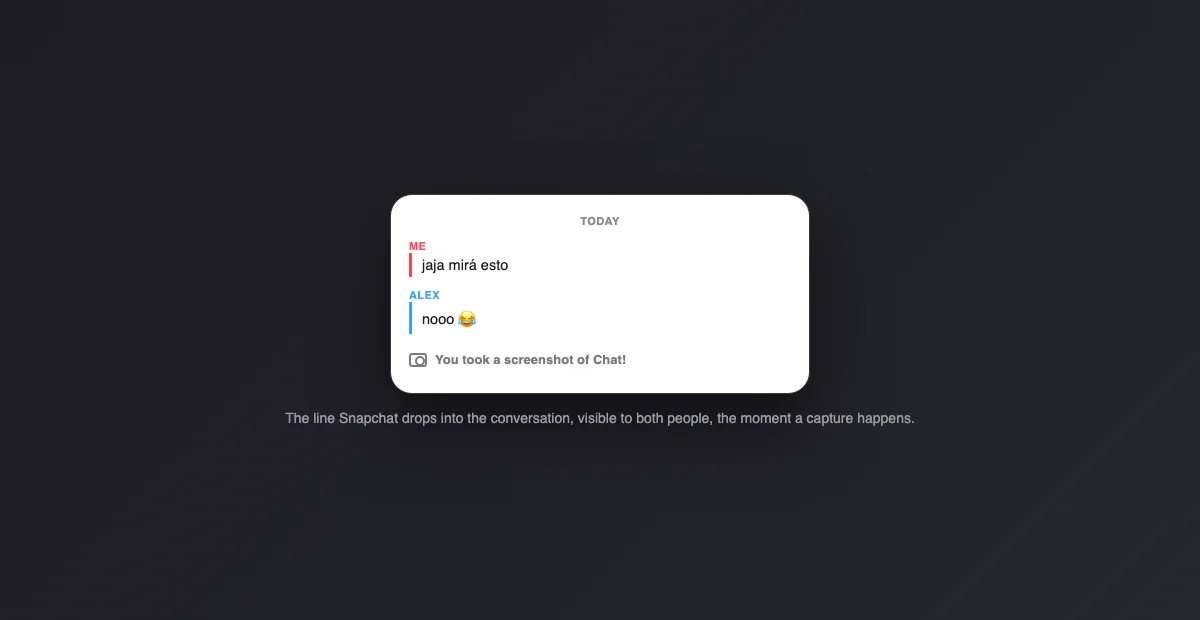
Surface by surface
| You screenshot… | Does the other person find out? |
|---|---|
| A snap someone sent you | Yes: "took a screenshot!" appears for the sender |
| A chat conversation | Yes: a line drops into the chat itself, visible to both |
| Someone's story | Yes: a screenshot icon next to your name in their viewer list |
| A profile | No |
| The Snap Map | No |
| Spotlight and public content | No |
| Your own memories and camera roll | Nothing to report; it is yours |
What each alert actually looks like
Three different mechanisms, one per surface. For a snap, the sender sees a notification and the double-arrow status icon next to your name changes to the crossed-arrows "screenshot" version; it also stays in the conversation view. For a chat, Snapchat drops a system line into the thread itself, "You took a screenshot of Chat!", which both people scroll past forever after. For a story, there is no push notification: a small screenshot icon appears next to your name in the story's viewer list, so the owner finds out when they check who viewed, exactly the quiet-marker model Instagram once used for disappearing photos.
Screen recording changes nothing
Recording your screen while a snap, chat or story is open triggers the same detection as a screenshot, with its own recording icon variant. Snapchat treats "kept a copy" as one category regardless of the tool, which closes the loophole every other app's design leaves open. The reliable exception is the one no software can see: a second phone pointed at the screen, which is worth knowing not as a trick but as the reason no app, Snapchat included, can ever promise a snap was seen once and gone.
The workaround folklore, checked
Every few months a new trick circulates: airplane mode before opening, clearing the cache after, opening the snap halfway. The status: Snapchat patches these continuously, and what worked in 2019 mostly reports the screenshot on reconnect today. The pattern to internalize is that detection happens client-side and syncs later, so cutting the network delays the report rather than preventing it. Anyone relying on a workaround is gambling that their version of the trick is newer than Snapchat's last patch, with their reputation as the stake.
Why Snapchat is the exception
Snapchat's founding pitch was that pictures disappear, and disappearing content is only credible if keeping a copy has consequences. Screenshot detection is the enforcement arm of that promise, which is why it shipped essentially at launch in 2011 and never left. The other platforms arrived at the opposite conclusion for their own reasons (public content is made to spread, and detection they cannot make watertight would only breed false confidence), which is exactly the divide our comparison table below captures.
How Snapchat compares with the other apps
| App | Screenshot notifications |
|---|---|
| Snapchat | Snaps, chats and stories: almost everywhere |
| Nowhere; disappearing DM photos are blocked outright instead | |
| Never notifies; view once media comes out black | |
| TikTok | Never |
| Only disappearing Messenger media |
The full story of each row lives in its own guide: Instagram, WhatsApp, TikTok, Facebook and VSCO. Snapchat is the anchor of the whole comparison: the one app where the folklore about screenshot alerts is simply true.
You got the "took a screenshot" alert: now what
Reading it calmly helps. The alert says a copy exists, nothing more: not where it went, not why. Most screenshots are mundane (saving an address, a meme, a plan), so the reasonable first move is asking, not accusing. If the content was sensitive and the capture feels like a violation, the practical steps are the platform ones: stop sending that person disappearing content, use the block if the trust is gone, and report if the captured material gets shared in ways that break Snapchat's rules or the law.
You took the screenshot: the etiquette that survives contact with reality
The notification means there is no discreet option, so the decision is really "is this worth the other person knowing". For logistics (addresses, times, lists) nobody reasonable minds, and saying "screenshotted so I don't lose it" first costs nothing. For anything personal, the capture reads as archiving something the sender chose to make temporary, and the alert guarantees that conversation happens. When the content matters, asking first is not just polite; it is strictly better strategy than being asked second.
The icon glossary, since the arrows do the talking
Snapchat reports captures through its icon language, worth decoding once:
| You see… | It means |
|---|---|
| Filled arrow next to a name | Sent, not yet opened |
| Hollow arrow | Opened |
| Crossed, overlapping arrows | They screenshotted your snap |
| Crossed arrows with a line | They screen recorded it |
| Screenshot icon in a story viewer list | That viewer captured your story |
Color carries the content type (red for snaps without audio, purple with audio, blue for chat), so the same crossed-arrow shape appears in whichever color the captured thing was. The shape is the alert; the color is just context.
Saving in chat: the other visible action
Screenshots are not the only kept-a-copy act Snapchat surfaces. Press and hold a chat message and Save in Chat pins it past the auto-delete, and saved messages display with a gray background both people can see, with your name attached to the save. It is the polite sibling of the screenshot: same permanence, built-in transparency, and for addresses and plans it does the job without a single alert firing. When the goal is remembering logistics rather than keeping an image, saving beats capturing on every axis.
Protecting your own snaps, realistically
The hierarchy: send disappearing content only to people you trust, because detection informs you of captures without preventing them. Use My Eyes Only for anything that should not sit in your regular memories. And calibrate to the alert system's real guarantee: you will know about in-app captures, you will never know about the second phone. Snapchat tells you more than any other app; it still cannot tell you everything.