The short answer
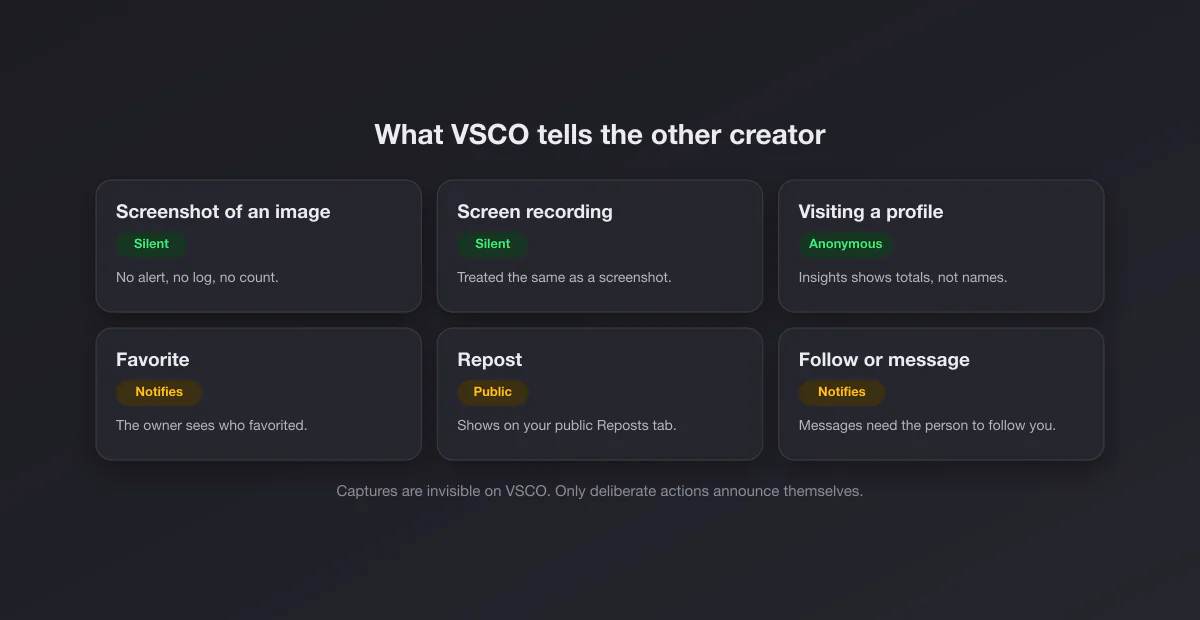
VSCO has no screenshot notification anywhere in the app. Capture a photo in the feed, a full profile grid, a journal, a DSCO or a message, and the creator receives no alert, no badge and no line in their activity. Screen recordings are equally invisible. VSCO's own help center addresses the question directly in its article on sharing images from another creator's profile: a creator "may not be notified if you take a screenshot of their content", followed by a polite request to use favorites, reposts and sharing instead. That cautious "may not" is legal hedging, not a hidden feature: no part of the documented notification system reacts to captures.
Surface by surface
| You screenshot… | Does the creator find out? |
|---|---|
| An image in the feed or its detail view | No |
| A whole profile grid | No |
| A journal or a DSCO | No |
| A Space | No |
| A message thread | No |
| Anything, as a screen recording | No, recording is as silent as a screenshot |
The pattern matches the rest of the photo and video category. Instagram reports nothing about feed posts, reels or profiles, and TikTok reports nothing at all. VSCO is, if anything, the quietest of the three, because it also hides public like counts.
What VSCO does tell the creator
The real question behind "does VSCO notify" is usually "what can the other person see about me". VSCO's answer is unusually short, and every item on it is something you do on purpose:
| Action | What the creator sees | Source |
|---|---|---|
| You favorite an image | A notification, and only they see who favorited | How Do I Favorite an Image? |
| You unfavorite it | Nothing; removing a favorite sends no notification | Same article |
| You repost an image | It appears on your public Reposts tab, visible to anyone | How to Use Reposts |
| You follow them | A notification that you followed | Blocking on VSCO |
| You message them | The message itself (only possible if they follow you) | Messages FAQs |
| You block them | Nothing; blocked creators are not notified | Blocking on VSCO |
| You view their profile | At most an anonymous count in Insights, for paid members | Understanding Your VSCO Insights |
| You screenshot or record | Nothing | Sharing images article, above |
All of the help center pages in this table were read on 2026-10-05. The design philosophy is consistent: VSCO tells creators about engagement you chose to make public or personal, and stays out of everything you merely look at.
Can VSCO creators see who viewed their profile?
Not by name. VSCO One and Pro members get Insights, a private dashboard that tracks image views, profile views, favorites, reposts, discussions and follower trends over preset periods. VSCO describes it as numbers and trends: daily profile views, new followers, which images are spreading. There is no visitor list, and VSCO's help page on growth with Profile Insights frames the whole feature around aggregate data that only the account owner can see. Members on the cheaper Plus tier and free accounts do not get Insights at all.
So the realistic worst case for a curious visitor is this: you open someone's profile ten times, their profile view count for that day goes up by some amount, and they have no way to attach a name to it. A screenshot of that profile adds nothing on top.
Why VSCO never built screenshot alerts
VSCO has always positioned itself as the anti-metrics photo community: no public like counts, no public follower counts, no public repost counts. VSCO's own favorites article says it outright: it "does not publicly show how many people favorited your images, your follower count or how many people republished your image." A screenshot alarm would be the opposite of that philosophy, turning a quiet look into a social signal. There is also the practical reason every photo app shares: images are made to be seen, and a public grid that complained every time someone saved a reference would mostly generate noise.
Messages, Spaces and journals
VSCO's newer social surfaces follow the same rule. Messages only work between people with a follow relationship (you can message someone who follows you), and nothing in the messaging documentation mentions capture detection: no disappearing media, no screenshot notice, no blocking of captures. Spaces, VSCO's shared collaborative boards, behave like the feed: what members see, members can capture silently. Journals and DSCOs (VSCO's short looping videos) are ordinary published content. If you need a conversation not to be captured, VSCO offers no tool for it, and a message thread on VSCO should be treated like any chat app without protection.
Screen recording counts the same
There is no separate "recording detected" mechanism on VSCO. A screen recording of a DSCO, a video post or a scrolling profile is as invisible as a still capture, and VSCO does not mark any content as protected at the operating system level, the way WhatsApp does for view once media or Instagram does for disappearing DMs. Nothing comes out black, nothing is refused.
How VSCO compares with the other apps
| App | Notifies screenshots? | Blocks captures? |
|---|---|---|
| VSCO | No, anywhere | No |
| No (legacy icon only on outdated apps) | Disappearing DM media and vanish mode | |
| TikTok | No | No |
| Snapchat | Yes, almost everywhere | No: it tells instead |
| No | View once media, profile photos | |
| Only disappearing Messenger messages | No |
Snapchat trained a generation to expect a screenshot alert, which is why the question gets asked about every app. VSCO sits at the opposite, fully silent end, together with TikTok and every major dating app.
The "who viewed my VSCO" apps are not real
Search this topic and you will find apps and sites promising to reveal who viewed or screenshotted your VSCO. None of them can work. VSCO does not expose screenshot events or viewer identities to anyone, including the account owner, so there is no data for a third party to read. These services make money by selling invented numbers or, worse, by asking for your VSCO login, which is how accounts get taken over. If an app needs your password to show you "visitors", close it.
Reposting vs screenshotting someone's photo
This is the part VSCO actually cares about. A screenshot is invisible, but it also strips the creator from the image: no credit, no link back, and often a crop that loses the edit. VSCO's sanctioned routes keep attribution attached. A favorite is private (only the creator sees it was you) and saves the image to your Favorites collection. A repost publishes the image on your profile with the creator credited. Share gives you a link to the original post, or forwards it in a message to someone who follows you. If your goal is a mood board for yourself, favorites do the job without a single screenshot in your camera roll.
If you do screenshot someone's work for a reference board, keep it private. Reposting a screenshot to another platform without credit is where silent capture becomes a copyright and etiquette problem, and that line exists whatever the notification system says.
If you are the creator: protecting your work
Because captures are silent and unblockable, the protective tools are about who sees your work in the first place. VSCO lets you block a creator, which removes their access to your profile, their past favorites and their reposts of your images, without notifying them. You can limit messages to people you follow. You can remove images from your profile at any time. For anything beyond that, the realistic assumption is the one that applies to every public photo platform: whatever is on someone's screen can be captured, and the defenses that work are a visible signature or watermark on the image itself, and a reverse image search when you suspect reuse.
If you post your VSCO edits elsewhere as screenshots, for a portfolio or a before and after, make the capture look intentional: our free screenshot beautifier adds padding, a background and rounded corners in the browser, without uploading anything.
VSCO on the web
vsco.co works the same way in a browser. Profiles and images are public pages, any desktop capture tool works on them, and nothing is reported. On a Mac, the system shortcuts in our Mac screenshot shortcuts guide capture a VSCO page like any other website; for a whole profile grid in one image, see full page screenshots in Chrome. Messages are app only, so there is nothing to capture on the web side.