The short answer
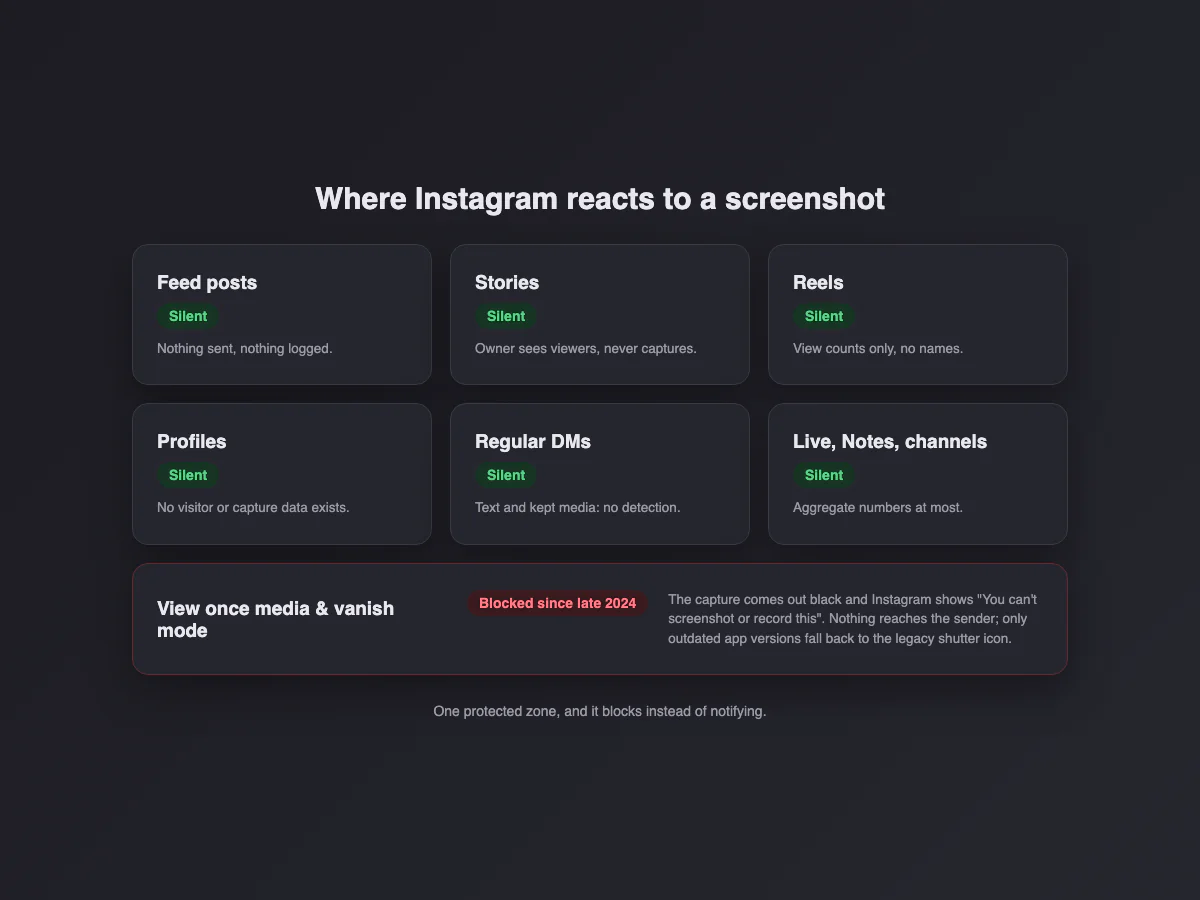
Instagram no longer notifies screenshots anywhere. Feed, stories, reels, profiles, normal message text: nothing is sent, nothing is recorded, nothing appears. And the one surface that used to notify (photos and videos sent with view once or allow replay, plus vanish mode) now does something stricter: since an update in late 2024 the capture is blocked outright. The screenshot comes out black, and the replay screen says it in plain words: you can't screenshot or record this.
Does the new Instagram update show screenshots? (October 2026)
No. As of 5 October 2026, no Instagram update has added screenshot alerts for posts, stories, reels, profiles, highlights or regular DMs. The question resurfaces with every big release (and every viral "Instagram will now tell people you screenshotted" post), but the last real change to screenshot behavior is the one from late 2024: disappearing photos and videos in DMs, and vanish mode, went from notifying the sender to blocking the capture outright.
One wrinkle worth knowing: Instagram's own Help Center articles on vanish mode and on the status of a disappearing photo you sent still describe a screenshot notice. That text matches the legacy behavior, which older app versions fall back to. On a current app, the capture fails first, so there is nothing left to notify. Either way the scope is the same: only disappearing DM content, never the feed, stories or reels.
| Period | Disappearing DM media and vanish mode | Everything else |
|---|---|---|
| 2018 (a few months) | Notified | Story screenshot alerts tested, then removed |
| 2019 to late 2024 | Notified (shutter icon in the chat) | Silent |
| Late 2024 to October 2026 | Blocked: the capture comes out black | Silent |
We will update this section, with its date, if that changes. If a post claims otherwise, check whether it names a surface: "Instagram notifies screenshots" with no surface attached is almost always the 2018 story test being recycled.
Does Instagram notify when you screenshot a post, reel or profile?
| You screenshot… | Does the other person find out? |
|---|---|
| A post in the feed | No |
| A story | No, even with close friends stories |
| A reel | No |
| A profile | No |
| A regular DM conversation | No |
| A disappearing photo or video in a DM | No, because the capture is blocked: it comes out black |
| Anything in vanish mode | No: blocked the same way |
Does Instagram notify when you screenshot a post?
No. A feed post, a carousel slide or a photo opened from someone's grid can be captured silently, from a public or a private account. The owner sees likes, comments, shares and saves, and none of those are triggered by a screenshot.
Does Instagram notify when you screenshot a reel?
No, and screen recording a reel is equally silent. The creator sees an aggregate play count and, on professional accounts, shares and saves. Nothing ties a view or a capture to your name.
Does Instagram notify when you screenshot someone's profile?
No. Profiles, bios, follower lists and grids carry no detection, and Instagram has no "profile visitors" list at all, so the owner cannot even see that you looked, let alone captured.
Does Instagram notify when you screenshot a DM?
Not for regular messages. Text, links, shared posts and photos sent with "keep in chat" can be screenshotted in any conversation, one to one or group, and the other person sees nothing. The only exception is the disappearing media described next.
What about disappearing photos (view once and allow replay)?
Send someone a photo from the camera inside a DM and you get three delivery options: view once, allow replay, or keep in chat. The first two are "disappearing media", and that is the protected zone. Instagram used to let the capture happen and drop a small shutter icon next to the message for the sender to find. Since late 2024 it does something stricter: the capture is refused. The screenshot saves as a black image, and the replay screen states it outright. Vanish mode (swipe up in a chat) applies the same blocking to the whole conversation. We verified this on a current iPhone in August 2026: the block screen below appears, and the sender's side shows nothing at all, because there is nothing to report.
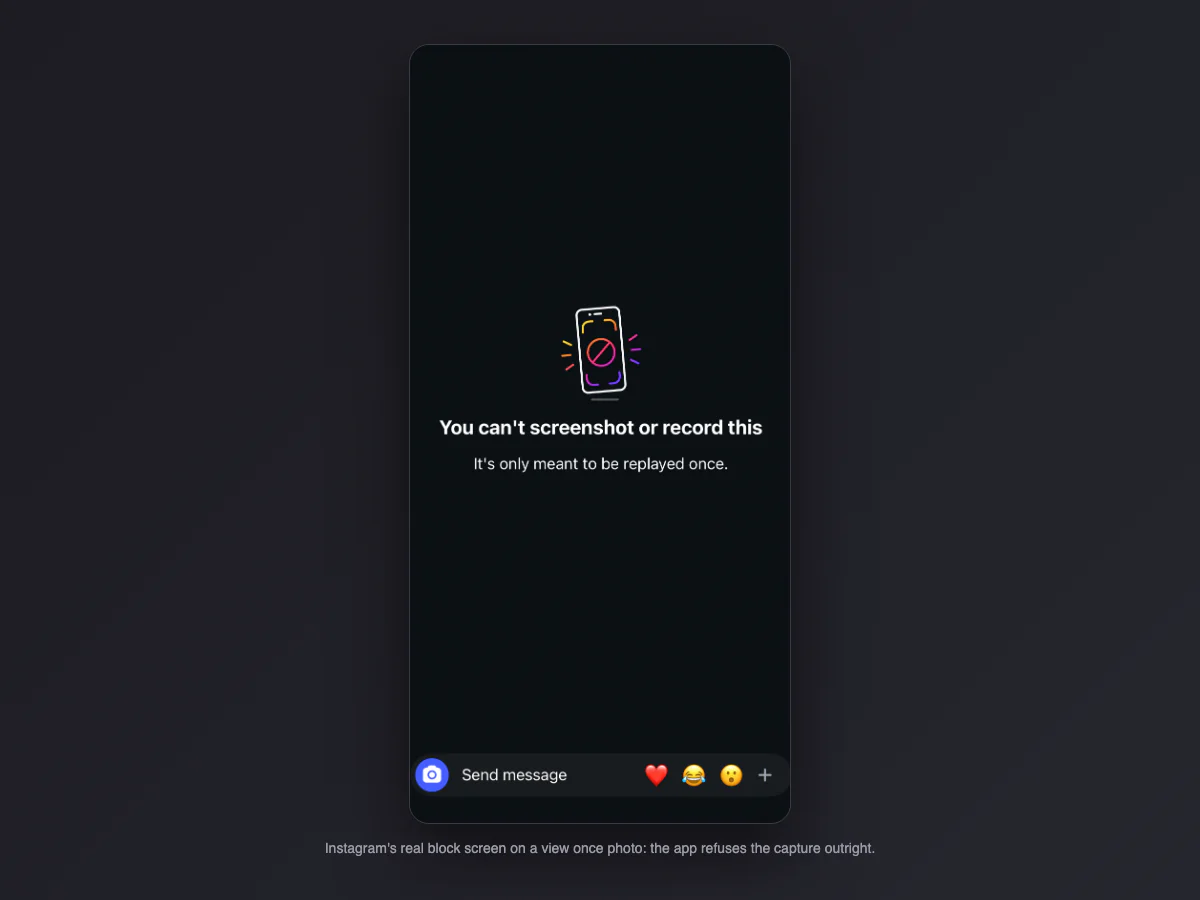
Two details people get wrong. First, the old shutter icon is not completely dead: on app versions old enough to predate the block, Instagram falls back to the legacy behavior and marks the chat with a screenshot icon instead. You cannot know which version the other person runs, so the safe assumption covers both: the capture fails, or it tells on you. Second, the protection covers the disappearing photo itself, not the chat around it: screenshotting the text messages in the same conversation still works and stays invisible.
Does Instagram notify when you screenshot a story?
No. Regular stories, close friends stories and highlights are all silent: the owner sees that you viewed a story (the viewer list lasts 48 hours) and nothing about captures. The story notification people remember was a 2018 test that Instagram ended the same year. The variants, story replies and the viewer list are covered in detail in does Instagram notify when you screenshot a story.
Can someone see if you screenshot their Instagram?
Instagram gives content owners exactly three visibility tools: story view lists, follower lists, and read receipts in DMs. There is no screenshot report, no "who saved my photo" panel, and every third-party app promising one is lying to you (and usually phishing your login). If a post is public, anyone can screenshot it, and the platform behaves accordingly.
Does Instagram notify screen recordings?
Instagram treats a screen recording of disappearing media exactly like a capture: blocked. The block screen names both actions ("you can't screenshot or record this"), and a recording that runs while the photo is open shows black for those frames. On every unprotected surface, recording is as invisible as screenshotting. So the rule compresses nicely: whatever blocks a screenshot blocks a recording, and nothing else reacts to either.
Does Instagram notify when you screenshot a highlight?
No. Highlights are stories pinned to a profile and inherit the same silence. The viewer list only exists during the first 48 hours after the story was posted; after that, the owner cannot even see who watched the highlight.
Does Instagram notify screenshots of lives, Notes or channels?
Three newer surfaces, same answer. Live videos: viewers can screenshot and record silently; the host sees the viewer list while live, and nothing about captures. Notes (the little bubbles above the inbox): no view list at all for most users, and no capture detection. Broadcast channels: the owner sees member counts and reactions, nothing about who captured a post. If it can be seen by many people, Instagram treats capturing it as expected behavior.
Does Instagram notify screenshots in vanish mode?
Vanish mode (swipe up inside a DM thread) turns the whole conversation into disappearing content, and it runs the same blocking. Android had it first: Instagram flags the vanish screen as secure, so the shortcut returns a black image or a "can't take screenshot" refusal, the same mechanism banking apps use. iPhone used to be the loophole: the capture worked and the chat got a "screenshot" notice. The late 2024 update closed it, and both platforms now refuse the capture. The era of quietly archiving a vanish chat is over, which is precisely the point of the mode.
What happens when you screenshot a view once photo?
People imagine a siren on the other person's phone; the reality is a wall on yours. Press the screenshot shortcut on a view once photo and the saved image is black. Open the photo again and Instagram shows the block screen: a crossed-out phone, "You can't screenshot or record this", "It's only meant to be replayed once". Nothing reaches the sender: no icon, no note in the chat, no notification, because no capture ever existed. The only people who still trigger the legacy shutter icon are those running app versions old enough to predate the block.
Can an app show who screenshotted my Instagram?
Search this topic and half the results are apps promising to reveal who screenshots or stalks your profile. Every one of them is fake, for one reason: Instagram's API does not expose screenshot events, viewer identities on posts, or profile visitors. There is no data to sell. The apps make their money in two ways: subscriptions for invented numbers, or worse, by asking you to log in with your Instagram credentials, which is account theft with extra steps. The tell is always the same: any app that needs your password to show you "who viewed your profile" is phishing. Instagram will never provide that feature precisely because it would change how freely people browse.
What does Instagram show the other person instead?
| Signal | Who sees it |
|---|---|
| Story viewer list (48h) | The story owner |
| "Seen" on DMs | The sender, unless read receipts are off |
| Activity status (green dot) | People you DM with, if enabled |
| Typing indicator in DMs | The open conversation |
| Reel and post view counts | Aggregate numbers only, no names for views |
| Screenshot of disappearing DM media | Nobody: the capture is blocked before it exists |
| Any other screenshot | Nobody |
How does Instagram compare with Snapchat and WhatsApp?
| App | Screenshot notifications | Blocking |
|---|---|---|
| Legacy only, on outdated app versions | Disappearing DM media and vanish mode come out black | |
| Snapchat | Almost everywhere | No: it notifies instead |
| Never | View once media and profile photos come out black | |
| Telegram | Only in secret chats | Secret chats on Android; protected groups and channels restrict saving |
| TikTok | No | No |
| Only disappearing Messenger messages | No |
Instagram used to sit in the middle of the design space (one notified surface, no blocking) and has since moved into WhatsApp's corner: block silently. Snapchat keeps the opposite philosophy, telling without blocking. Photo-first apps like VSCO sit with Instagram and TikTok: no alerts at all.
Can creators see who screenshots their posts?
If your worry is content theft rather than privacy, screenshots were never the metric that mattered: reposts are. What Instagram gives you: story mentions notify you when someone shares your post to their story; the reshare count on reels and posts shows aggregate spread; and rights holders can use the in-app reporting flow for stolen reposts. For everything else, reverse image search on your own most-shared images finds reposts faster than any screenshot alarm would.
How do you stop people screenshotting your Instagram?
The hierarchy: a private account limits who sees things at all, close friends narrows stories further, and disappearing DM media is the only layer that actively blocks capture. For anything beyond that, assume that whatever appears on someone else's screen can be captured, because it can: at minimum with another camera.
Screenshotting your own content for a portfolio or a post? Make it look deliberate: our free screenshot beautifier adds padding, background and a window frame right in the browser.