The short answer
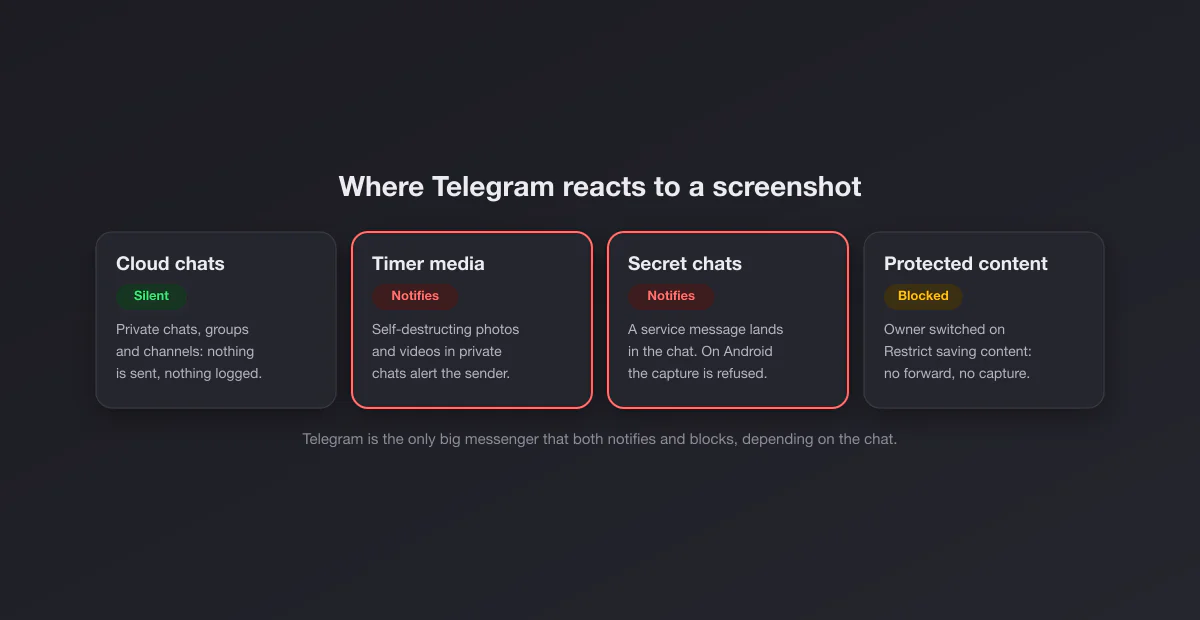
Telegram runs three different regimes at once, which is why people get contradictory answers:
- Normal (cloud) chats, groups and channels: silent. Capture anything and nobody is told.
- Secret chats and self-destructing media: they notify. The other person sees a message in the chat saying you took a screenshot.
- Protected content: blocked. When a group or channel owner restricts saving content, or a story is posted with screenshots disallowed, the capture is prevented rather than reported.
So the one-line answer is: Telegram only notifies screenshots in secret chats and on disappearing media, and blocks them where an owner has asked it to.
Surface by surface
| You screenshot… | What happens |
|---|---|
| A normal one to one chat | Nothing. No notification. |
| A group chat | Nothing, unless the group restricts saving content |
| A public or private channel | Nothing, unless the channel restricts saving content |
| A group or channel with content protection | The capture is blocked |
| A secret chat | The other person is notified (and on Android the capture is usually refused) |
| A self-destructing photo or video in a private chat | The sender is notified |
| A story with "Allow Screenshots" turned off | The capture is blocked |
| A normal story, profile or profile photo | Nothing |
Secret chats: the one place Telegram tells on you
Secret chats are Telegram's end-to-end encrypted mode. You start one from a contact's profile (the three dots menu, then Start Secret Chat on most versions), it shows a padlock next to the name, and it lives only on the two devices involved rather than in Telegram's cloud. According to Telegram's FAQ on secret chats, messages there cannot be forwarded, can carry a self-destruct timer, and screenshots are reported: Telegram says it will "make every effort to alert you about screenshots taken in your Secret Chats".
In practice the alert is a small service line in the conversation, visible to both sides, saying that a screenshot was taken. There is no push notification with a sound; the other person sees it the next time they look at the chat.
The FAQ is also unusually candid about the limits. It warns that "it may still be possible to bypass such notifications and take screenshots silently", notes that there is no bulletproof way of detecting screenshots on certain systems (it names some Android devices), and ends with the only advice that holds everywhere: share sensitive information only with people you trust.
Why Android behaves differently
Because detection is unreliable on Android, Telegram's Android app takes the stricter route in secret chats and generally prevents the capture instead, the same mechanism banking apps use. Depending on the phone you get a black image or a system message saying the screenshot cannot be taken. On iPhone, where the system tells apps when a screenshot happens, the capture goes through and the notice appears in the chat. Same feature, two very different experiences, and the source of most "Telegram told on me" versus "Telegram blocked me" arguments.
Self-destructing photos and videos in normal chats
You do not need a secret chat to get the notification. Since Telegram 4.2 you can set a self-destruct timer on a photo or video in an ordinary one to one chat (in the media picker, tap and hold the send button or use the timer icon, depending on your version). The recipient opens it, the countdown starts, and the media disappears when it ends. Telegram's announcement of the feature, published in July 2017, is explicit: "If the recipient tries to make a screenshot of your disappearing media, you'll get a notification immediately."
Two practical points. The timer works in private chats only, not in groups or channels. And the notification covers the disappearing media itself; the ordinary text messages around it in the same chat remain silent to capture.
Protected content in groups and channels
In December 2021 Telegram gave group and channel owners a switch called Restrict Saving Content (shown as content protection in some versions). According to the official announcement, it restricts forwarding of messages from that chat and also prevents screenshots and limits saving media. Nobody is notified, because nothing gets captured: on most devices the screenshot comes out black or the system refuses it.
How to tell if a chat is protected: the Forward and Save options disappear from the message menu, and media has no download button. Paid course channels and many private communities use it, which is why people suddenly hit black screenshots in one channel and not in another.
Owners turn it on in the group or channel settings, under the chat type section (where you choose public or private), with the toggle for saving content. It applies to everyone in that chat, including admins viewing on their own devices.
Stories can disallow screenshots too
When Telegram added stories in 2023, it gave each story its own capture setting. According to Telegram's stories announcement, the privacy menu for a story lets you choose whether to allow screenshots; turning it off prevents viewers from capturing it and hides the in-app options to save or share it. A story posted with screenshots allowed behaves like a normal post: anyone can capture it, and the author learns nothing beyond the viewer list.
How to start a secret chat (and see the notice yourself)
If you want to see exactly what the other person would see, set up a secret chat with a friend and try it together:
- Open your friend's profile in Telegram on your phone.
- Tap the three dots menu (or More) and choose Start Secret Chat. Your friend has to be online for the chat to be set up, since the encryption keys are exchanged between the two devices.
- Send a message, then take a screenshot of the conversation.
- On iPhone, a service message appears in the chat on both sides. On Android, the capture is typically refused or comes out black instead.
That is also the quickest way to settle the argument when two friends swear Telegram did opposite things: they were probably on different platforms.
The myths, sorted
"Telegram notifies every screenshot now." No. Normal cloud chats, which is what almost every Telegram conversation is, have never notified. Only secret chats and self-destructing media do.
"Channel admins can see who screenshots posts." No. Channel statistics show views, shares and reactions in aggregate, never captures. The only thing an admin can do is prevent captures with content protection.
"Telegram Premium lets you see screenshots." No. Premium adds things like larger uploads, faster downloads and extra customization, and nothing about screenshots.
What Telegram never reports
Everything else in Telegram is silent. That covers profile photos, bios, usernames, public channels without protection, normal groups, normal stories, voice chats and video chats. Screen recordings follow the same rules as screenshots: silent where screenshots are silent, notified in secret chats on platforms that can detect it, black where content is protected.
Telegram Desktop and Telegram Web
On a computer, the normal chats are as silent as on the phone, and any system shortcut works: Win + Shift + S on Windows, Shift + Command + 4 on a Mac. Secret chats are not available in Telegram Web or in the cross-platform Telegram Desktop app, so the screenshot alert question mostly does not arise there (the native macOS app is the exception, since it supports secret chats). Protected chats still hide forward and save options on desktop; how a system-level screenshot of them behaves depends on the app and operating system, so do not assume a capture that works on one computer works on another.
How Telegram compares with other messaging apps
| App | Notifies screenshots | Blocks screenshots |
|---|---|---|
| Telegram | Secret chats and self-destructing media | Protected groups and channels, stories without screenshots allowed, secret chats on Android |
| Never | View once media and profile photos | |
| Snapchat | Almost everywhere | No: it notifies instead |
| Legacy only | Disappearing DM media and vanish mode | |
| Discord | Never | No |
| iMessage | Never | No |
Telegram is the odd one out because it mixes both philosophies. Snapchat tells without blocking; WhatsApp blocks without telling; Telegram tells in some places and blocks in others, depending on which kind of chat you are in.
Can you trust the secret chat notification?
Treat it as a deterrent, not a guarantee. Telegram itself says notifications can be bypassed, a second phone pointed at the screen is invisible to every app, and the receiving app version and operating system change what happens. The useful mental model: in a secret chat, a careless screenshot will probably be announced; a determined one may not be. If something should never be kept, the safest option is not to send it.
If you need to keep a Telegram conversation
For a normal chat, Telegram Desktop has an export tool (in the chat's menu, Export Chat History) that saves messages and media as HTML or JSON, which is far more complete than a stack of screenshots. Secret chats and protected chats cannot be exported, by design. For a single message you want to show someone, a screenshot is still the quickest route, and our screenshot beautifier can tidy it up in the browser before you share it.