The short answer
Discord does not notify anyone when you take a screenshot, and it does not block screenshots either. Capture a DM, a server channel, someone's profile, a voice call or a stream, and nobody receives an alert, a system message or an audit log entry. Screen recordings are just as invisible. If you want proof that the feature does not exist, Discord's own community forum has long-running user requests asking for screenshot notifications in DMs, which would not be needed if they existed.
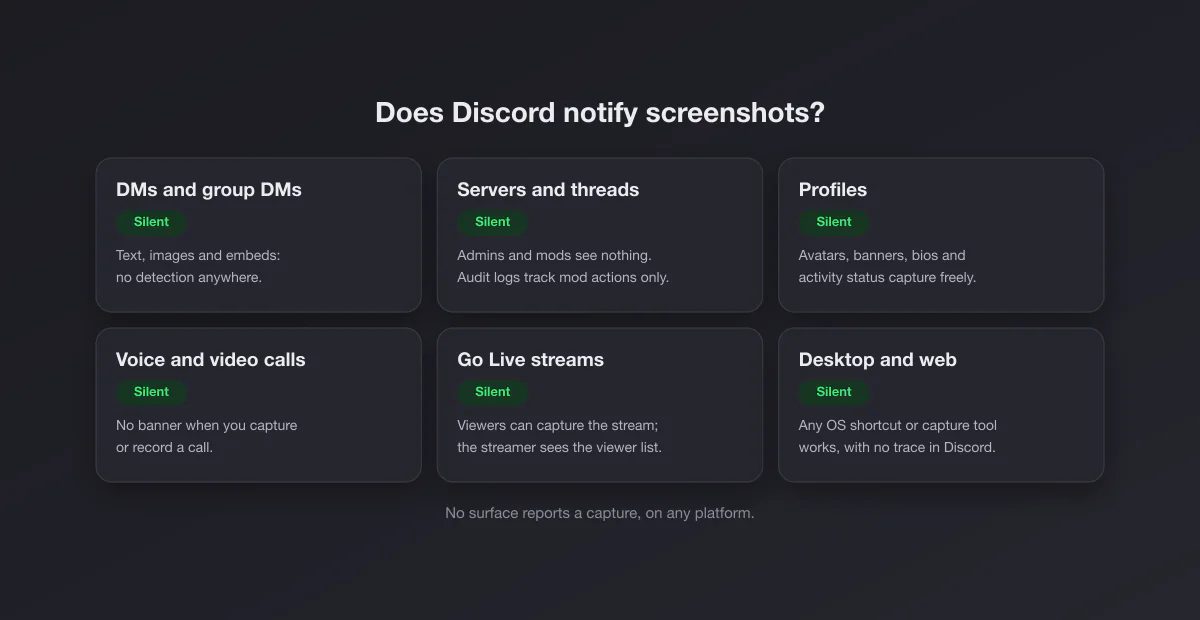
Surface by surface
| You screenshot… | Does anyone find out? |
|---|---|
| A direct message | No |
| A group DM | No |
| A server channel or thread | No, not even the admins |
| A forum post or announcement channel | No |
| Someone's profile, avatar, banner or bio | No |
| An image or video someone sent | No |
| A voice or video call | No |
| A Go Live stream you are watching | No |
| Any of the above as a screen recording | No |
Discord has no disappearing messages, no view once media and no protected channels, so unlike Telegram or Snapchat there is no special zone with its own capture rules. The answer is the same everywhere.
Server admins and moderators cannot see screenshots
A common worry is that server staff have some tool the rest of us do not. They do not, at least not for screenshots. The server audit log records moderator actions (bans, kicks, role changes, deleted channels, edited settings), and bots can log message edits and deletions, joins and leaves. None of that includes screen captures, because a screenshot happens in your operating system, outside Discord, and Discord never receives any event about it. A moderation bot cannot see what your phone or computer does with the pixels on your screen.
What Discord does show other people
| Signal | Who sees it |
|---|---|
| Online, idle, do not disturb or invisible status | Friends and server members, as you set it |
| "Is typing…" | Anyone in the channel or DM |
| Activity status (game, Spotify, stream) | Friends and server members, if you share it |
| Reactions and replies | Everyone in the channel |
| Joining a voice channel or watching a stream | Everyone in that voice channel, and the streamer sees viewers |
| Read receipts | Nobody: Discord does not have them for users |
| Screenshots and screen recordings | Nobody |
Two of those rows matter for the screenshot question. First, Discord has no "seen" receipts, so nobody can tell you even opened a message, let alone captured it. Second, watching someone's stream is not anonymous: your avatar appears in the viewer list while you watch. Capturing the stream adds nothing to that list.
Clips: the one recording feature that announces itself
Discord's Clips feature lets someone who is streaming save the last moments of their stream (and, depending on settings, the voice channel audio) as a short clip. It is the nearest Discord gets to a capture notification, and it works differently from screenshots: when someone with Clips enabled starts streaming, other people in the voice channel are told that clipping is on, and each user has a privacy setting to keep their own voice out of other people's clips. Discord explains the details in its Clips support article. A plain screenshot or a system screen recording triggers none of this, because it does not go through Discord at all.
Calls and streams: no alert, but not a free pass
Taking a screenshot of a video call or recording a voice channel with OBS or a system recorder produces no banner on anyone's screen. That silence is technical, not legal. Recording conversations without the participants' consent is restricted in many countries and states, and Discord's community guidelines also prohibit sharing other people's private information. If you need a record of a call (a team meeting, a tabletop session you want to recap), ask first; the request takes ten seconds.
One related surprise: if you share your own screen and it shows a streaming service like Netflix, viewers often see a black rectangle. That is copy protection in the browser or app being shared, not Discord detecting anything.
Capturing Discord messages as evidence
Most Discord screenshots that matter are evidence: harassment, scams, threats, a server owner promising something. Screenshots alone are weaker than people think, because a screenshot of a chat is easy to fake and contains no verifiable link to the original. Do both of these:
- Capture with context. Include the username, the full message, the timestamp (hover the time on desktop for the exact date), and the messages around it. On desktop, the user's profile popout shows their username, which matters because display names can be changed in seconds.
- Copy the message link. With Developer Mode enabled (User Settings, Advanced), right click a message and choose Copy Message Link; you can also copy user IDs. Moderators and Discord's Trust and Safety team work from the reported message itself, so reporting it in the app (right click or long press the message, then Report Message) carries more weight than any image.
- Report before you block. Blocking hides the messages from your view, which makes them harder to capture later. Capture, report, then block.
If someone deletes a message, it disappears for everyone, and only a logging bot in a server (if the server has one) keeps a copy. That is the real argument for capturing early.
The myths, sorted
"Nitro users can see who screenshotted their messages." No. Nitro adds things like bigger uploads, custom emoji everywhere and profile customization. There is no screenshot data for it to show.
"There are bots that detect screenshots in a server." No bot can. Bots see what the Discord API exposes (messages, edits, deletions, joins, reactions), and the API has no screenshot event because Discord never receives one. A bot that claims to detect captures is either lying or just guessing from someone posting an image.
"Discord shows a notice when you screenshot on mobile." No. The iPhone does tell apps that a screenshot happened, but Discord does not act on it and shows nothing to anyone.
"Deleted messages are safe from screenshots." Only if nobody captured them first. Deleting removes the message from Discord, not from someone's camera roll, and some servers run logging bots that keep a copy of deleted messages for moderators.
Sensitive media filters are not capture protection
Discord can blur images it flags as sensitive or explicit, depending on your privacy and safety settings and the age of the account. Like Bumble's Private Detector, that protects the person viewing from seeing something unexpected. It does not stop a capture and it does not report one: tap to reveal the image and it can be screenshotted like anything else.
Phone, desktop and browser
The answer is identical everywhere, but the method differs:
- Windows: Win + Shift + S for a region. If it does nothing, see Win + Shift + S not working. The full list of shortcuts is in how to screenshot on Windows.
- Mac: Shift + Command + 4, then Space to capture just the Discord window. More in Mac screenshot shortcuts.
- Browser: discord.com captures like any web page. Do not count on full page screenshots in Chrome for a long conversation, though: Discord's chat scrolls inside its own panel, so the full page capture only gets what is on screen. Several captures in order are more reliable.
- iPhone and Android: the usual button combination. Discord does not block captures on mobile.
How Discord compares
| App | Notifies screenshots | Blocks screenshots |
|---|---|---|
| Discord | Never | No |
| Telegram | Secret chats and self-destructing media | Protected groups and channels |
| Snapchat | Almost everywhere | No |
| Never | View once media, profile photos | |
| Legacy only | Disappearing DM media | |
| iMessage | Never | No |
Discord sits at the fully open end: no notifications and no blocking. It treats everything in a channel as something the people in that channel can see, keep and quote.
Assume your messages can be captured
The flip side of silent screenshots is that anything you post can travel. Server messages are visible to everyone in the channel, including people who joined five minutes ago, and DMs can be captured by the person you sent them to. The practical rule for Discord is the same one that applies to email: do not write anything you would mind seeing in a screenshot, because there will be no warning if it happens.
Sharing a clean screenshot
If you are posting a Discord capture in a bug report, a changelog or a community update, crop out other users' names and avatars unless they agreed, and give it some breathing room. Our screenshot beautifier adds padding, rounded corners and a background in the browser without uploading anything.