The short answer
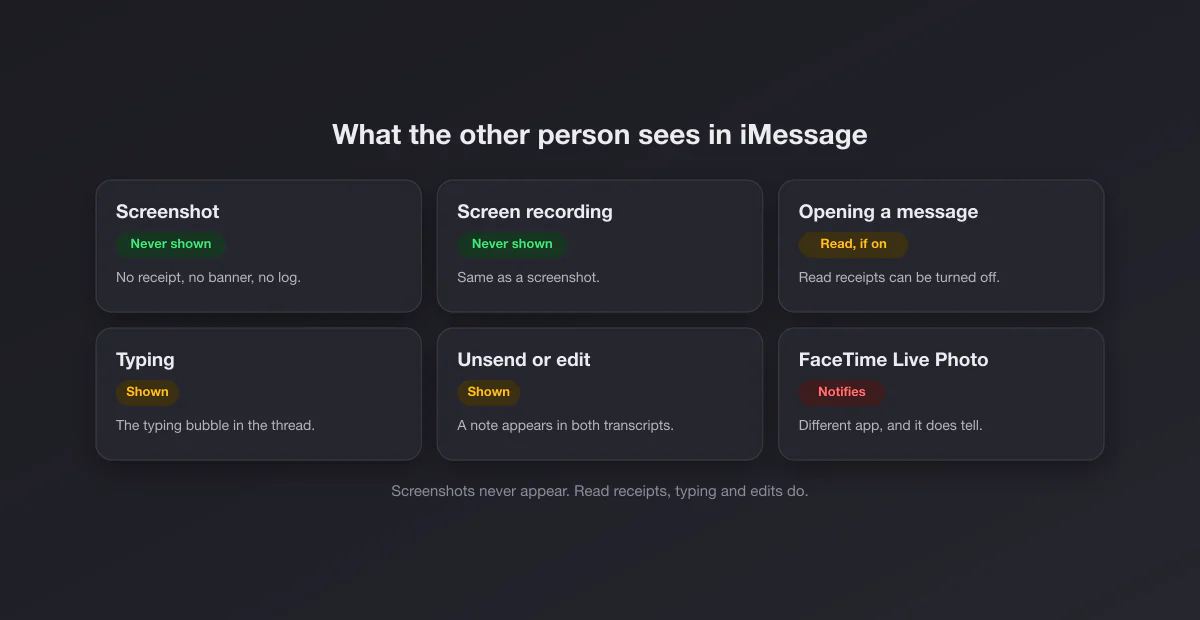
iMessage has no screenshot notification, and never has. When you press the side button and volume up on an iPhone (or Shift + Command + 4 on a Mac) inside a conversation, the screenshot is taken by the operating system and saved to your Photos library or Mac folder. Nothing is sent, nothing is added to the conversation, and no "screenshot" label appears on either side. The same applies to green bubble conversations over SMS, MMS or RCS. Screen recordings are equally invisible.
Apple's own documentation backs this up by omission. The iMessage overview in the iPhone User Guide lists what the other person can see about you (that you are typing, and that you have read a message if read receipts are on), and screenshots are not on that list. The guide's Take a screenshot page describes no notification of any kind. Both pages were read on 2026-10-05, in their iOS 27 versions.
Surface by surface
| You screenshot… | Does the other person find out? |
|---|---|
| A one-to-one iMessage conversation | No |
| A group chat | No, nobody in the group is told |
| A photo or video someone sent you | No |
| A message with an effect, like invisible ink | No (you capture whatever is visible at that moment) |
| A green bubble SMS, MMS or RCS chat | No |
| A long thread, as a Full Page screenshot | No |
| Messages on a Mac or iPad | No |
| Anything, as a screen recording | No |
What iMessage does show the other person
The anxiety behind the question is usually broader: "what can they see about what I do in this chat?" The complete documented list follows, and none of it involves captures.
| Signal | What they see | Can you turn it off? |
|---|---|---|
| Read receipts | "Read" under their message once you open it, instead of "Delivered" | Yes: Settings > Apps > Messages > Send Read Receipts, or per conversation |
| Typing indicator | The typing bubble while you write | No setting for it |
| Unsend | A note in both transcripts that a message was unsent | No, the note always appears |
| Edit | "Edited" on the message, with earlier versions viewable | No |
| Tapbacks and replies | Your reaction or reply, obviously | Only by not sending them |
| Screenshots and screen recordings | Nothing, ever | Nothing to turn off |
The details come straight from Apple. The read receipts page explains that with receipts on the sender sees "Read", and otherwise "Delivered". The unsend and edit page says you can undo a message for up to 2 minutes, that "a note confirming that you unsent the message appears in both conversation transcripts", and that edits (up to five, within 15 minutes) are marked Edited with previous versions visible to both people.
Unsend does not beat a screenshot
This is the practical consequence people miss. If someone sends a message and unsends it a minute later, any screenshot you took in that minute stays in your Photos library: unsending removes the message from the conversation, not from images that already exist. The reverse is true for you as a sender. If you send something you regret, unsending it within two minutes removes it from their thread, but you have no way of knowing whether they captured it first, and they will see a note that something was unsent. The same goes for edits: the original wording is viewable in the edit history anyway, and a screenshot of the first version needs no history at all.
Also note Apple's caveat: unsending only works fully when both people use recent software. If the recipient runs an older system, Apple says "the original message remains in the conversation" and you are told they may still see it. Green bubble messages cannot be unsent or edited at all.
Where the "Apple notifies screenshots" idea comes from
There is one Apple feature that really does announce a capture, and it lives in the app right next door: FaceTime Live Photos. When someone takes a Live Photo during a FaceTime video call using the shutter button, Apple's iPhone User Guide states "You both receive a notification that the photo was taken." That is the source of most "my iPhone told them I took a screenshot" stories. A normal screenshot of the same FaceTime call stays silent. The full breakdown, including how to turn Live Photos off, is in does FaceTime notify screenshots.
The other source is simply Snapchat, which notifies almost everywhere and trained people to expect that every messaging app does the same. iMessage is at the opposite end.
Screen recording in Messages
Recording your screen from Control Center while scrolling a conversation or playing a video someone sent produces a normal recording, with no alert to anyone. Messages does not mark any content as protected, so nothing comes out black the way WhatsApp view once media or Instagram disappearing photos do. iMessage has no view once photos and no disappearing messages at all; audio messages can be set to expire, but that controls how long they are kept, not whether they can be captured or recorded while they play.
Group chats
A group conversation works exactly like a one-to-one chat: any member can capture the thread, and nobody is told, including whoever created the group. The realistic leak path in a group is human, not technical: the screenshot gets forwarded. If a group includes people you do not know well, treat what you write there as shareable.
Messages on Mac and iPad
Because iMessage syncs across your Apple devices, a conversation can be captured on a Mac just as easily as on a phone, with Shift + Command + 4 for a selection or Shift + Command + 4 then Space for the Messages window alone. Nothing is reported from the Mac either. Our how to screenshot on a Mac guide covers every method, and if the Mac shortcut does nothing at all, see screenshot not working on Mac.
Capturing a whole conversation
Long threads are the one place where screenshots get tedious, and the iPhone's Full Page option only works in apps that support it (Safari, for example), not reliably in a Messages thread. The options:
- Several screenshots, scrolling between them with a little overlap. Not elegant, but every message keeps its timestamp context.
- Select and copy individual messages with touch and hold, then paste them into Notes. Good for text, loses the layout.
- On a Mac, widen the Messages window to fit more per capture, and use a window capture so every image has the same framing.
If the screenshots are evidence (a dispute, a harassment report, an agreement), capture with the contact name and dates visible, and do it before anyone has a chance to unsend. As with any chat app, the conversation itself is the record, and the screenshot is your copy of it.
How iMessage compares with other messaging apps
| App | Notifies screenshots? | Blocks captures? |
|---|---|---|
| iMessage | Never | No |
| Never | View once media, profile photos | |
| Telegram | Only in secret chats | Protected content in some groups and channels |
| Snapchat | Yes, almost everywhere | No |
| No (legacy icon on outdated apps) | Disappearing DM media, vanish mode | |
| Messenger | Only disappearing messages | No |
| Discord | Never | No |
iMessage is one of the most permissive apps on this list: no alerts and no blocking. It is end-to-end encrypted, which protects messages in transit, but encryption says nothing about what the person at the other end does with what is on their screen.
If you are the one worried about leaks
Since iMessage gives you no capture protection, the protective habits are about what you send. Keep anything you would not want screenshotted out of text entirely, or say it on a call. Use unsend for genuine mistakes, knowing it leaves a note and cannot reach captures already taken. If you need content that disappears or resists capture, iMessage is the wrong tool; an app with view once media or protected chats is the right one, with the permanent caveat that a second phone pointed at the screen defeats every app.
And if the screenshots you take are of your own conversations for a post, a support ticket or a portfolio, crop out what is not needed (cropping on a Mac takes seconds) and blur any names and numbers before sharing. Our free screenshot beautifier adds a clean frame and background in the browser without uploading anything.