The short answer
There is no single best screenshot app for Mac; there are four good answers to four different questions.
- You capture now and then: the built-in tools (⇧⌘4, ⇧⌘5 and Markup) are enough, and they are free.
- You want the most for nothing: Shottr. Free, tiny, with scrolling capture and OCR. No video.
- You want everything in one polished tool: CleanShot X, $35 once, with paid renewals for updates and a Pro plan for cloud links.
- You record short framed clips and hate subscriptions: Capturo, our app, $29 once. No scrolling capture and no OCR, so not for everyone.
Snagit makes sense if you also work on Windows, and Xnapper if your screenshots mostly end up on social media. The details, prices and trade-offs are below.
The comparison table
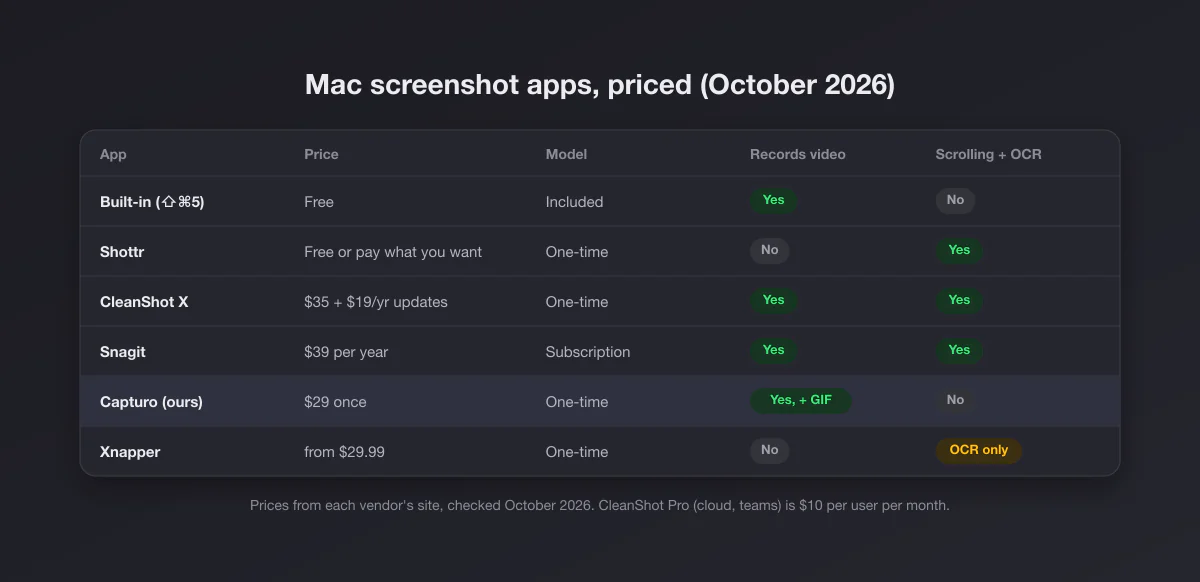
| App | Price (Oct 2026) | Model | Video | GIF | Scrolling capture | OCR |
|---|---|---|---|---|---|---|
| Built-in (Screenshot app) | Free | Comes with macOS | Yes | No | No | Live Text, partially |
| Shottr | Free, or pay what you want | Optional license | No | Before/after GIFs only | Yes | Yes |
| CleanShot X Basic | $35, then optional $19/yr for updates | One-time | Yes | Yes | Yes | Yes |
| CleanShot X Pro | $10 per user per month, billed yearly | Subscription | Yes | Yes | Yes | Yes |
| Snagit Individual | $39 per year | Subscription | Yes | Yes | Yes | Yes |
| Capturo (ours) | $29 once, 30-day refund | One-time | Yes, with system audio | Converted from clips up to 45 s | No | No |
| Xnapper | From $29.99 (1 Mac) | One-time, 1 year of updates | No | No | No | Yes |
Every price above comes from the vendor's own pricing page, checked in October 2026. Prices change, discounts come and go, and education or team pricing differs, so treat the table as a snapshot and click through before you buy.
What "one-time" really means in this category
Read the fine print before you count a one-time price as the final price. Three different models hide behind the same words:
- One-time with an update window. CleanShot X Basic and Xnapper both sell a perpetual license that includes one year of updates. After that the app keeps working forever on the version you have, and you pay again only if you want new versions ($19 a year for CleanShot, a 40% renewal discount for Xnapper).
- One-time with no renewal at all. Capturo's $29 license is the whole price; there is no update tier to renew.
- Subscription. Snagit Individual is $39 a year, and CleanShot's cloud and team features live in its Pro subscription. Stop paying and those features stop.
None of these is a scam; they are different bets. Update windows are honest pricing for apps that keep shipping features. Just compare like with like: over three years, CleanShot Basic costs $35 if you never renew and $73 if you always do.
1. The built-in tools: free and better than people remember
macOS already does more than most people use. ⇧⌘3 captures the whole screen, ⇧⌘4 a region, ⇧⌘4 then Space a single window with its shadow, and ⇧⌘5 opens the Screenshot toolbar with a timer, a save location picker and screen recording. The floating thumbnail opens Markup for crops, arrows, text and a signature. Our full list of Mac screenshot shortcuts covers the clipboard variants and the rest.
What you do not get: scrolling capture, OCR beyond Live Text in Preview, GIF export, blur for private data, backgrounds, or any way to pin a capture above your windows. If you have never felt the lack of any of those, stop reading and save your money.
2. Shottr: the best free screenshot app for Mac
Shottr is the answer for people who capture a lot of stills and want speed. It is free to use for as long as you like, with an optional pay-what-you-want license. In return you get scrolling capture, OCR and QR reading, annotation, pixelation and object removal, a screen ruler, a color picker, pinned captures and S3 upload. It runs on macOS 10.15 and later, so it also covers older Macs that paid apps have dropped.
The limit is clear: Shottr does not record video. If you only ever capture stills, it may end your search here.
3. CleanShot X: the widest feature set
CleanShot X is the most complete tool in the category, and that is why it tops most lists. Screenshots, screen recording with computer audio, GIF recording, a video editor, scrolling capture in any app, OCR, annotation, hiding desktop icons, and a hosted cloud for share links.
Pricing has two layers. Basic is $35 once with a year of updates and 1 GB of cloud storage; renewing updates is optional at $19 a year. Pro is $10 per user per month billed yearly, with unlimited cloud, custom domains, team management and SSO. It needs macOS 13 or newer and comes with a 30-day money-back guarantee.
If you use most of that surface every day, CleanShot is worth it and we would tell a friend to buy it. If you only need part of it, see our CleanShot X alternatives.
4. Snagit: for people who also use Windows
Snagit is the veteran: capture, scrolling capture, text grab, templates, step-by-step guides and video. Its strongest argument on a Mac is that one subscription covers Mac and Windows, which matters if your work laptop runs Windows and your home machine is a Mac. Snagit Individual is $39 per user per year and requires macOS 14 or later.
If you are on a Mac only, the subscription is harder to justify against the one-time options above. Our Snagit alternatives page lists the cheaper routes, and Snagit vs the Snipping Tool covers what the money buys on Windows.
5. Capturo: ours, for polished clips without a subscription
Disclosure: we make Capturo, so weigh this section accordingly. It is a native Mac app of about 2 MB. ⇧⌘2 captures and opens straight into an editor with arrows, shapes, text, highlight and pixelated blur. ⇧⌘9 records the screen or an area with system audio, composed live over a gradient background with rounded corners, with an optional webcam bubble, microphone (macOS 15+) and auto-zoom on clicks (beta). Recordings are MP4; GIFs come from a recording: Convert Video to GIF makes a 12 fps, 960 px wide GIF from clips up to 45 seconds. Your logo and website can be stamped on every export, and any capture can be pinned above your windows.
It costs $29 once, with a 30-day money-back guarantee, and it runs on macOS 14 or later, Apple Silicon or Intel. Everything stays on your Mac: no account, no cloud. There is no trial: without a license, exports carry a watermark and recording is locked. Download Capturo.
Where Capturo is the wrong pick: it has no scrolling capture, no OCR, and no share links. If you capture long web pages or pull text out of images every day, Shottr or CleanShot X will serve you better. And it is Mac only. If recording is your main use, our best screen recorder for Mac comparison goes deeper on audio and price.
6. Xnapper: pretty stills for social posts
Xnapper focuses on one job: turning a screenshot into something postable. It balances the capture automatically, picks a background color, sizes it for social networks, and redacts sensitive data automatically (emails, card numbers, IP addresses, API keys). On-device OCR is included. It is free with a watermark; a one-time license starts at $29.99 for one Mac with a year of updates, $54.99 for two and $79.99 for three. It does not record video.
Which one should you get?
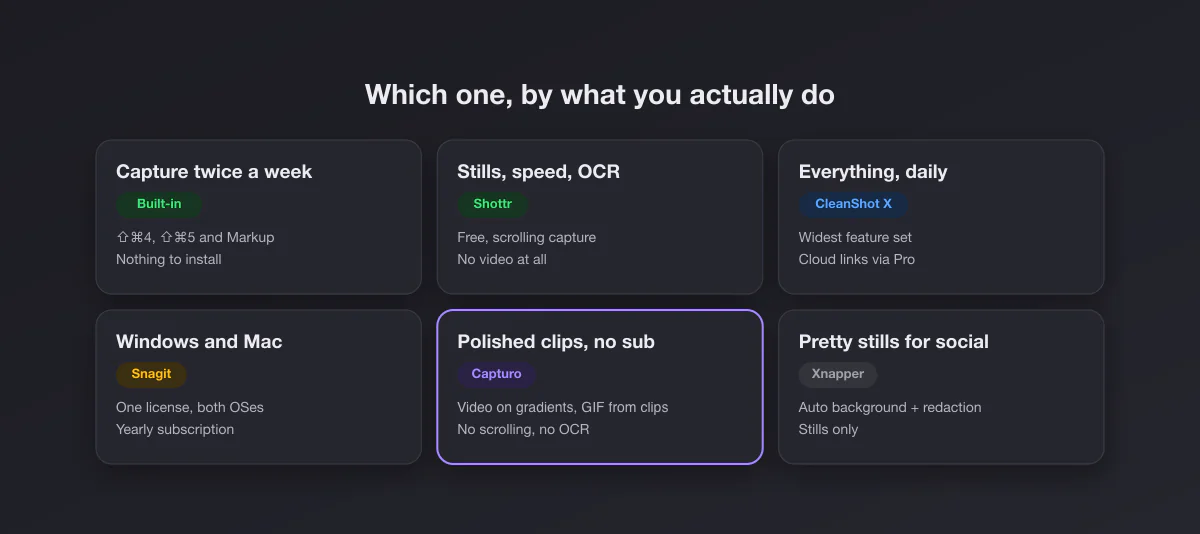
| If you… | Get | Why |
|---|---|---|
| Capture a few times a week | Built-in | Free, already there |
| Capture stills all day and want OCR | Shottr | Free, fast, scrolling capture |
| Use scrolling, OCR, recording and cloud links daily | CleanShot X | Only tool that does all of it well |
| Switch between a Mac and a Windows PC | Snagit | One license, both systems |
| Record framed clips for docs, PRs or social, no subscription | Capturo | $29 once, composed recordings |
| Post screenshots on social media | Xnapper | Auto layout and redaction |
Features that matter more than the feature list
Comparison tables reward long lists. In daily use, three less visible things decide whether you keep an app:
- What happens after the capture. Does it open an editor, copy to the clipboard, or drop a file on the desktop? The best app is the one whose default matches your next step.
- Whether it replaces the system shortcuts. Apps that take over ⇧⌘4 feel native; apps with their own shortcut need a new habit. Both work; pick one deliberately.
- Weight and privacy. Some apps are native and a few megabytes, others bundle a browser engine. Some upload by default, some never do. If your screenshots contain client data, local-only is a feature.
Free options people overlook
Before paying, try the free route for a week. Use ⇧⌘5 with the timer for menus, Markup for arrows, and Preview's crop (our guide to cropping a screenshot on Mac covers the shortcuts). For a clean background and rounded corners on a single image, our free screenshot beautifier does it in the browser, without uploading anything. If you need a different format, the PNG to JPG converter runs locally too. If a week passes and you never missed anything, the built-ins are your best screenshot app.
Where your screenshots go, whichever app you pick
Every tool here can change its save location, and most people never do. By default macOS saves to the Desktop, which turns into a wall of files within a month. Pointing captures to a dedicated folder, or straight to the clipboard, is the single cheapest workflow upgrade. Our guide on where screenshots go on a Mac shows how, with the built-ins and in general.