The answer, without hedging
Instagram sends no notification, marker, icon or list entry when someone screenshots a story. It does not matter whose story, what account type, which phone, or whether you follow each other. Screen recordings are equally invisible. The only thing a story owner ever receives about you is the fact that you opened the story, through the viewer list. That is the whole system.
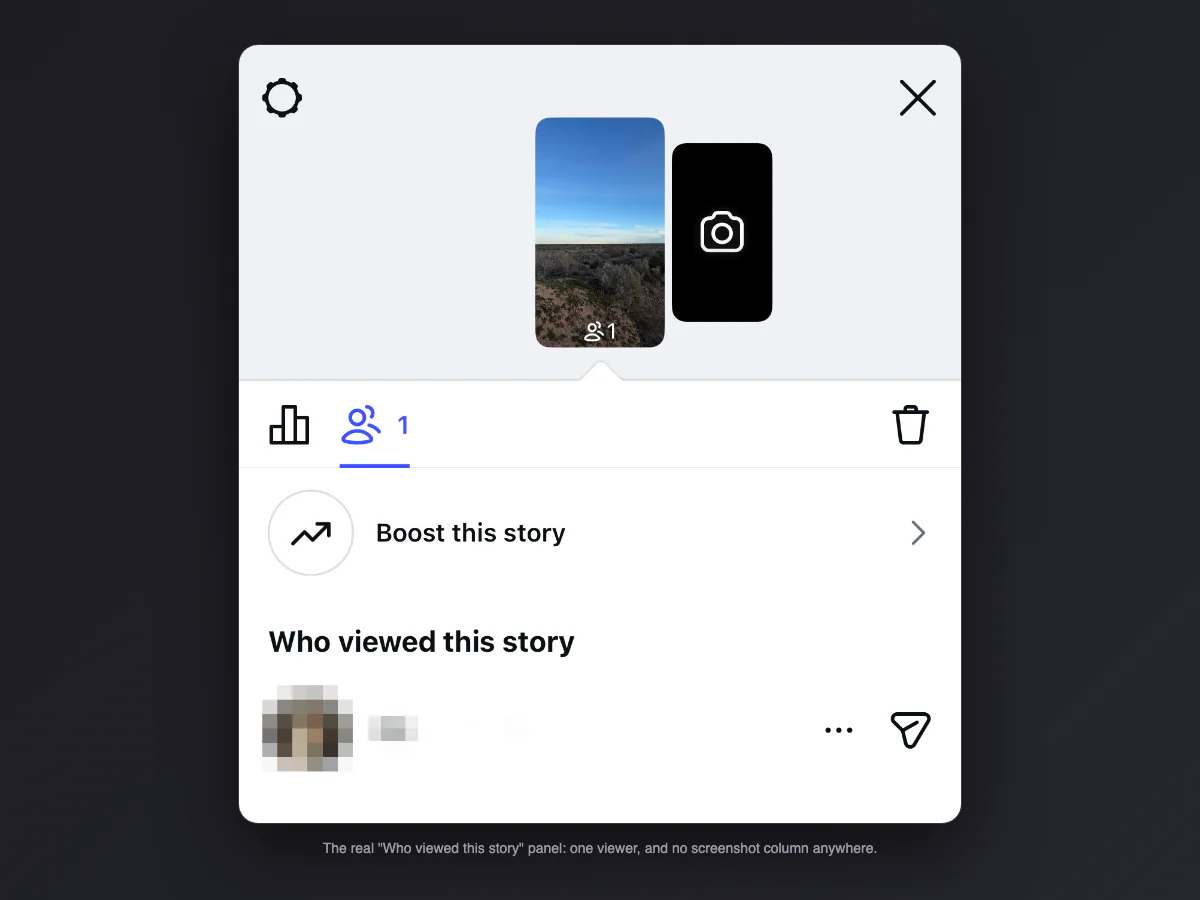
Can people see if you screenshot their Instagram story? No
The other way this question gets asked deserves its own plain answer: no, people cannot see if you screenshot their Instagram story, and you cannot see who screenshots yours. There is no hidden panel, no business-account statistic, no paid feature that unlocks it. The data is simply never collected. Any app or website claiming to reveal story screenshotters is fabricating numbers, and the ones that ask for your Instagram login are phishing for your account.
What the owner actually sees: the viewer list
Open your own story and swipe up: that is the viewer list, and it is the full extent of story surveillance. It shows who opened the story while it is live, for 48 hours after posting. It does not show how many times someone rewatched, how long they looked, whether they took a screenshot, or whether they saw it on a phone or a laptop. When the 48 hours end, the list is gone for good; the archive keeps the story, not the names.
Story type by type
| You screenshot… | What the owner learns |
|---|---|
| A regular story | Nothing. You appear in the viewer list for having opened it, same as everyone. |
| A close friends story | Nothing extra. The green ring changes the audience, not the detection. |
| A highlight | Nothing, and once 48 hours have passed since the story was posted the owner cannot even see who viewed it. |
| An expired story in someone's archive | Only the owner can open the archive at all. |
| A story reply thread in DMs | Nothing. That is a regular DM screenshot, silent like all of them. |
| A live video saved to a story | Nothing. Live and story rules are the same: viewer lists, no capture detection. |
The story signals that DO notify, for contrast
Stories are not a surveillance-free zone; they just watch different things. Knowing what fires a notification makes it obvious that screenshots are not on the list:
| Action on a story | Does the owner find out? |
|---|---|
| Viewing it | Yes: your name enters the viewer list |
| Replying | Yes: it lands in their DMs |
| Reacting with an emoji | Yes: also a DM |
| Voting in a poll or quiz | Yes: votes are not anonymous, the owner sees names |
| Sharing their story with a friend | No, but the friend can view it and join the list |
| Screenshotting or recording it | No, never |
The poll row surprises the most people: quiz answers and poll votes are shown to the owner with names attached, while the screenshot everyone worries about reports nothing.
Why everyone believes the opposite
Three reasons, stacked. In February 2018 Instagram publicly tested story screenshot notifications, journalists covered it heavily, and the test was shut down within months; the articles still rank and still get read. Snapchat, the app stories were copied from, does notify screenshots almost everywhere, and people carry that assumption across. And Instagram DMs genuinely do protect disappearing photos, which people misremember as a story feature. Three half-truths melt into one durable myth.
The one place Instagram does react is not stories
Disappearing photos and videos in DMs (view once and allow replay) are the protected zone: since late 2024 Instagram blocks the capture outright, the screenshot comes out black, and the replay screen says "You can't screenshot or record this". None of that machinery touches stories. If you want the full map of every Instagram surface, it is in our guide to whether Instagram notifies screenshots.
The airplane mode trick, tested
The classic advice says: load the story, switch on airplane mode, screenshot, close the app, reconnect, and your view never registers. The honest version: this is unreliable. The story is often marked as viewed the moment it renders, queued locally, and synced when you reconnect. Sometimes it works, sometimes your name shows up in the viewer list an hour later, and you cannot tell in advance which it will be. Since the screenshot itself is invisible either way, the trick only exists to hide the view, and it is bad at that. A logged-out browser or a second account hides a view far more reliably.
Anonymous story viewers exist, and they prove the point
Search "view Instagram stories anonymously" and you find a whole industry of websites that show public accounts' stories without logging a view. Whatever you think of them, their existence settles the screenshot question: those services download the story media itself, entirely outside the app, and Instagram cannot see any of it. If entire stories can be fetched invisibly, a screenshot inside the app was never going to be the thing that exposes you. The practical caveats: they only work on public accounts, and entering your own login into one is handing your account to a stranger.
Screenshot vs screen recording a story
A screenshot freezes one frame and mutes it. For a story with video or music, screen recording captures the motion and the audio, and it is exactly as invisible as a screenshot. On iPhone, add Screen Recording to Control Center and start it before opening the story. On Android, the quick settings tile does the same. The one caveat is quality: stories stream compressed, so record on good Wi-Fi and the result stays watchable.
The desktop route nobody thinks of
Stories play on instagram.com in any browser, and a desktop capture is often better than a phone one: bigger source render, no notification bar in the frame, and cropping tools within reach. On a Mac it is Shift + Command + 4 to drag over the story; on Windows, Win + Shift + S. The viewer list still records that your account opened it, like on the phone, and nothing records the capture.
If it is your content on the other side
Flip the perspective: your stories can be captured silently by anyone who can see them, and that is a fact to plan around rather than fight. The controls that actually work: close friends for anything sensitive, hide story from for specific people, and a private account as the outer wall. What Instagram does tell you about is resharing: if someone shares your post to their story you get a mention notification, and reshare counts are visible on your end. Screenshots were never part of that deal, on any platform where stories exist.
Saving your own story, and the music problem
Your own stories save themselves: the archive keeps every story automatically (Settings, Archiving, Save story to archive), which is why screenshotting your own content is rarely necessary. The catch appears on download: pulling a story out of Instagram often strips the licensed music, leaving a silent video, because the license lives inside the platform. The workaround everyone lands on is the one this page already covered: screen record your own story playing, audio included. Legal for your own memories, and the only route that keeps the sound.
Stories on other apps
Instagram is the quiet one. Snapchat tells the poster when you screenshot a story, TikTok stays silent but shows profile views to people who opted in, WhatsApp status sends nothing, and VSCO has no alerts at all.
Capturing a story you plan to share
Screenshotting a story for a group chat is one thing; reposting it is another. If it is going anywhere public, credit the account, or better, use the built-in share arrow so the original gets its mention. And if the capture itself needs to look decent, our free screenshot beautifier wraps it in padding, a background and a clean frame right in the browser, no install.