The short answer
Tinder has no screenshot detection. Capture someone's profile, their photos, their bio and anthem, or your entire conversation, and the other person receives nothing: no alert, no icon in the chat, no line in any activity list. Screen recordings behave exactly the same. Tinder's own help center and Safety Center describe reporting, blocking and unmatching in detail and never mention screenshot alerts, because there are none to describe. That matches the rest of the category: Hinge and Bumble made the same choice.
Surface by surface
| You screenshot… | Does the other person find out? |
|---|---|
| A profile card while swiping | No |
| Their photos, opened full size | No |
| Bio, prompts, interests, anthem | No |
| Your chat with a match | No |
| A GIF, photo or link they sent in chat | No |
| Your own Likes You or matches screen | No |
| Anything, recorded as a screen video | No |
There is no "except" row. Tinder has no disappearing media, no view once photos and no protected screens, which is where other apps put their capture rules. Without them, there is nothing for a notification to hang on.
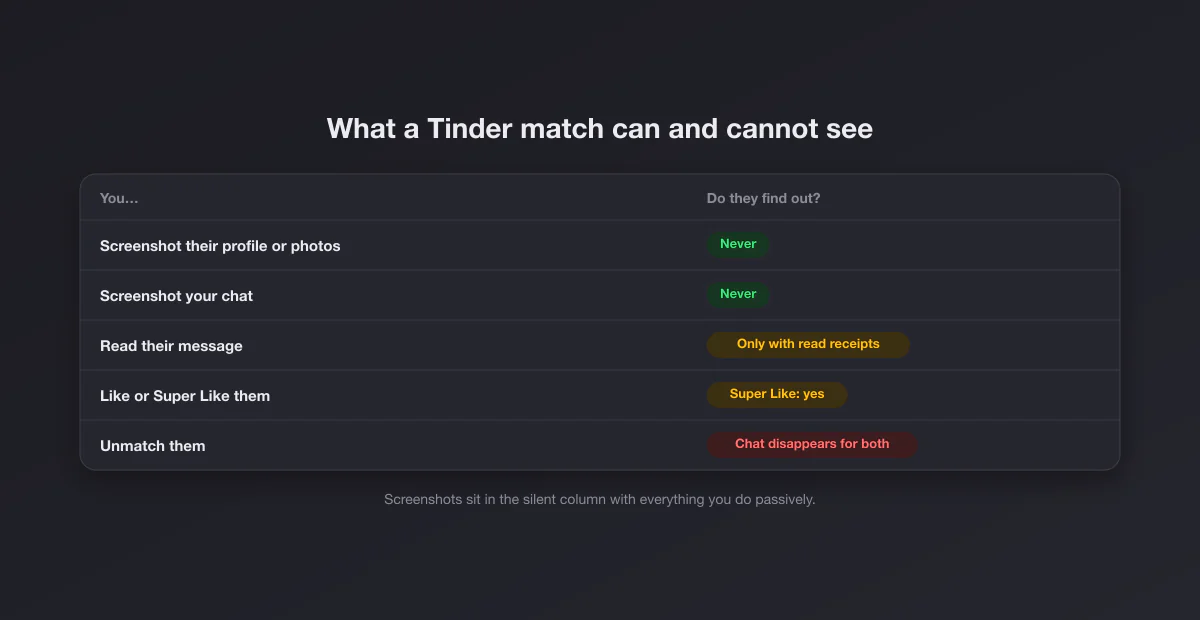
What a match actually can see about you
The real worry behind the screenshot question is usually wider: what does Tinder reveal about what I do? The full list is below, and screenshots are not on it.
| Signal | Who sees it |
|---|---|
| A regular like | Nobody, until it becomes a match (subscribers with Likes You see it earlier) |
| A Super Like | The person you sent it to: your card arrives marked with a blue star |
| A match | Both of you |
| That you read their message | Only if read receipts were activated for that match |
| Recently active status | Matches, if you have it switched on |
| A screenshot or screen recording | Nobody |
The pattern is simple: Tinder tells people about the things you send them, and never about the things you quietly do on your own screen. Swiping left is invisible, reading a profile three times is invisible, and capturing it is invisible.
The Super Like is the only thing that "tells on you"
If you have ever had the feeling that Tinder exposed you, this is almost certainly why. A Super Like puts your profile in front of the other person with a blue star before they decide anything, which is the closest Tinder gets to an unsolicited alert. A slip of the thumb (swiping up instead of right) sends one. It is not a screenshot alert, but it is the source of most "Tinder notified them" stories, so it is worth knowing which gesture does it.
Screenshots inside your friend group: normal, and where the line is
A large share of Tinder screenshots exist so a friend can weigh in: a funny bio, a suspicious photo, an opener that needs a second opinion. That is how the app is actually used, and it harms nobody when it stays in a trusted chat. The line people mostly agree on is publication. Posting a stranger's profile publicly, with face, first name and job attached, moves from vetting to exposure, and it is also the kind of thing Tinder's community guidelines and most social platforms treat as harassment. Screenshot freely; publish never.
Capture before you unmatch
This is the most practical fact on the page. According to Tinder's Safety Center page on unmatching, when you unmatch someone you disappear from each other's match lists and they can no longer see you or message you. The conversation goes with it. If a match turns threatening, asks for money or pushes you toward a crypto "investment", the evidence lives in a chat that one tap can erase, and the other person can erase it too by unmatching you first.
The order that protects you:
- Screenshot the profile. Name, age, photos, bio, job. It vanishes from your view after the unmatch.
- Screenshot the chat with context. Whole messages, in order, with any usernames, phone numbers or payment requests visible. One cropped bubble can mean anything; a run of messages cannot.
- Report. Tinder's unmatch flow lets you pick a reason, which generates a report to its Trust and Safety team, and the Safety Center says you can still report a profile online afterwards.
- Then unmatch or block. Last, not first.
Romance scams and screenshots
The classic scam pattern on dating apps runs on speed and isolation: rapid affection, a move to WhatsApp or Telegram "because I'm rarely on here", then a story that ends in a payment request or an investment platform. Screenshots work against both levers. Showing a conversation to a friend adds the outside opinion scammers try to avoid, and captured payment requests, wallet addresses and usernames are exactly what platform reports and police reports are built from. If the conversation does move to another app, the rules change with it: on WhatsApp captures are silent too, while Telegram secret chats do announce them.
Your own profile can be captured, so write it that way
Symmetry cuts both ways. Anyone who sees your card can capture it without you knowing, and dating profiles travel further than people assume, into group chats you will never see. That is not a reason for paranoia, just for calibration: keep identifying specifics out of photos (street signs, car plates, your building, a work badge), skip your full name and exact employer, and write the bio as if it were public, because in practice it is.
The myths, sorted
"Tinder started notifying screenshots in a recent update." There is no such feature in Tinder's help center, Safety Center or release notes. This rumor resurfaces every few months, usually from people confusing Tinder with Snapchat, which does notify, or with Instagram, which blocks captures of disappearing DMs.
"Tinder Gold or Platinum subscribers can see who screenshotted them." No. The paid tiers show who liked you, let you see likes earlier or add notes to Super Likes, and unlock read receipts for purchase. None of them expose capture activity, because Tinder does not collect it.
"The other person sees a screenshot icon in the chat, like on Snapchat." No. Tinder chats show messages, GIFs and, if purchased, read receipts. There is no screenshot marker of any kind, on either side.
"Apps can tell you who screenshotted your Tinder." Any third-party app making that claim is inventing numbers or fishing for your login. Tinder offers no such data to anyone.
Safety tools Tinder offers instead
Rather than screenshot alerts, Tinder puts its effort into tools around the conversation. Its Safety Center describes features like prompts that ask a sender "Are you sure?" before an offensive message goes out, a "Does this bother you?" check on messages you receive that leads straight to reporting, photo verification (the blue checkmark), and options to block contacts from your phone so people you know do not see your profile. All of these are about controlling who sees you and what reaches you, which is a more useful kind of protection than learning after the fact that someone saved a picture.
iPhone, Android and Tinder on the web
The answer does not change by platform. On iPhone and Android, Tinder does not block captures on any screen, so the normal shortcuts work everywhere in the app and nothing comes out black. On a computer, tinder.com behaves like any web page: Windows shortcuts like Win + Shift + S (see how to screenshot on Windows) or Shift + Command + 4 on a Mac (see how to screenshot on Mac) capture it silently. The web version is also the easiest way to capture a long conversation, because the chat panel is taller.
How Tinder compares with other apps
| App | Notifies screenshots? | Blocks screenshots? |
|---|---|---|
| Tinder | No | No |
| Hinge | No | No |
| Bumble | No | No |
| Snapchat | Yes, almost everywhere | No |
| No | Disappearing DM media | |
| Telegram | Secret chats and timer media | Protected groups and channels |
Dating apps sit at the fully silent end of the spectrum. If you are used to Snapchat's rules, that is the adjustment: on Tinder, nothing you capture is ever announced.
Screenshots as a reason to slow down
One last angle that is easy to miss. Because nothing is announced, you can treat a screenshot as a pause button: capture the profile, close the app, and look again in an hour with a friend. Many safety guides recommend exactly that kind of second look before agreeing to meet someone, and a reverse image search on a captured profile photo is one of the fastest ways to spot a stolen picture. Tinder's photo verification (the blue checkmark) helps too, but it confirms that the photos match the person behind the account, not that the person's story is true.
If you want a capture to look clean
Sharing a profile screenshot with a friend is fine raw. If you are using a capture somewhere more visible (a safety talk, a blog post, a report you want to read clearly), crop out notification bars and blur names first. Our screenshot beautifier adds padding and a background in the browser without uploading anything, and the guides to cropping on Mac and cropping on Windows cover the rest.