The short answer
Bumble has no screenshot notifications on any screen. Profiles, photos, prompts, the chat itself, voice notes, video calls: capture any of them and the other person gets nothing. Screen recordings are equally silent. Bumble's help pages explain blocking, reporting and unmatching in detail and describe no screenshot alerts anywhere, which is consistent with how the whole dating category works: Tinder and Hinge do not notify either.
Surface by surface
| You screenshot… | Does the other person find out? |
|---|---|
| A profile while swiping | No |
| Photos, prompts and badges | No |
| Your chat with a match | No |
| A photo they sent in chat | No (explicit images arrive blurred first, see below) |
| A voice or video call | No |
| A Bumble For Friends profile or chat | No |
| Any of the above as a screen recording | No |
As on Tinder, there are no disappearing messages, view once photos or protected screens in Bumble chats, so there is no surface where a capture rule could even apply.
The unmatch rule that makes Bumble different
Bumble is the one dating app where unmatching is deliberately asymmetric, and that matters more for screenshots than any notification would.
According to Bumble's own guide to unmatching, when you unmatch someone your conversation disappears and they can no longer message you or see your profile. But for the person who was unmatched, the conversation does not simply vanish: Bumble introduced a change in November 2020 so that the chat stays visible in a grayed out state, which lets them still report the member who left. The reason was safety. Bad actors were using unmatch to erase the evidence of what they had written.
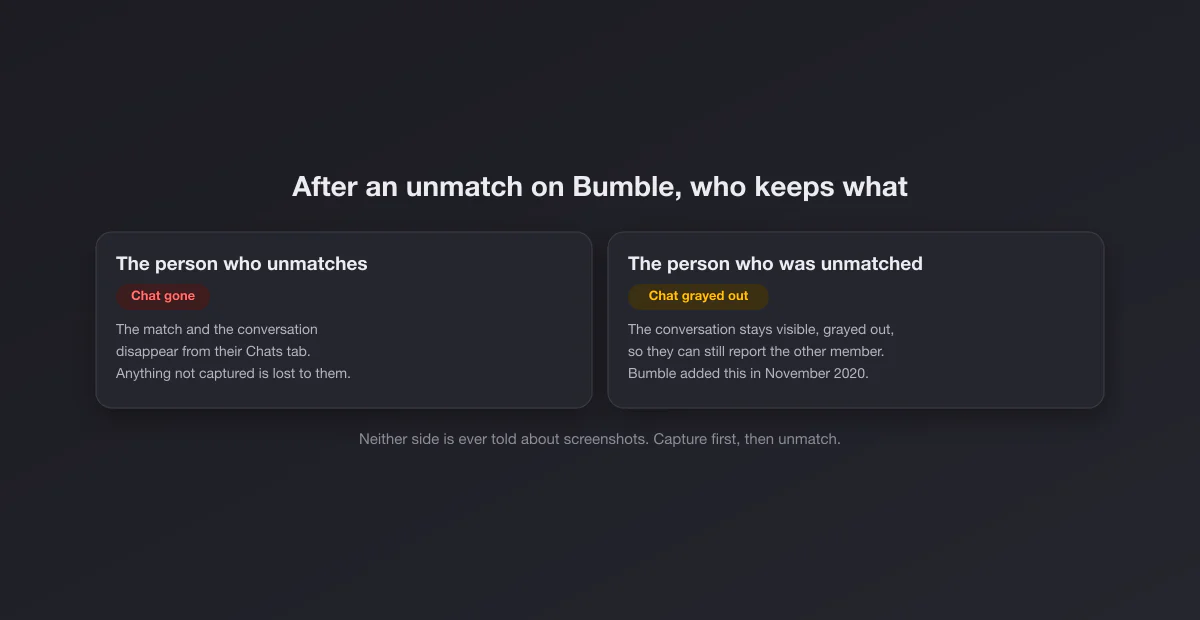
What that means in practice:
- If you are the one unmatching, the chat leaves your screen. Anything you might need later has to be captured before you tap.
- If someone unmatches you, the grayed out conversation stays reportable from inside the app. Screenshots are still worth taking, because a report is easier to follow up with your own copy in hand, and the conversation can disappear from your view in other ways (a deleted account, for instance).
Capture, report, then unmatch
The order that protects you is the same one every safety guide recommends:
- Capture the profile: name, age, photos, job, anything identifying. It goes away with the match.
- Capture the conversation with context: whole messages in order, including any phone number, social handle, link or payment request.
- Report. Bumble's support pages describe reporting from the chat itself: the three dots at the top right of the conversation lead to Unmatch and Report, where you pick a reason.
- Unmatch or block last.
None of these steps is visible to the other person until the report or unmatch takes effect, and the screenshots never are.
Explicit photos arrive blurred, and that is not a screenshot feature
Bumble runs a tool it calls Private Detector, which, according to Bumble's support page, automatically blurs images it detects as lewd and lets the recipient choose whether to view, block or report them. It is often confused with screenshot protection, but it is something else: it protects the recipient from unwanted images. It does not stop anyone from capturing a photo, and it does not tell the sender anything about what you did with it. If someone sends you an unsolicited explicit image, a screenshot of the blurred message plus a report is the usual route.
What Bumble does show the other person
| Signal | Who sees it |
|---|---|
| A regular like (swipe right) | Nobody until it becomes a match, unless they pay to see who liked them |
| A SuperSwipe | The recipient, who sees that you are especially interested |
| A match and the countdown to reply | Both of you |
| Your messages | The match, obviously |
| Unmatching | The match: the chat turns gray on their side |
| Screenshots and screen recordings | Nobody |
The SuperSwipe is Bumble's equivalent of Tinder's Super Like, and it is the one action that announces interest before a match. Everything passive, including capturing, stays private.
Video and voice calls
Bumble lets matches call each other inside the app without exchanging numbers, which is useful for checking that someone is who they claim before meeting. Those calls have no capture detection: a screenshot or screen recording during a call sends no banner to the other side. The usual caveat applies with more force here than in chat, though. Recording a person's voice or video without their consent is regulated in many places, and an app staying silent does not make it legal. Assume a first video call could be captured on either side, and behave accordingly.
The group chat review: fine in private, not in public
Profiles go into friends' group chats constantly, and that is how most people actually use dating apps. Sharing within a trusted circle for a second opinion is ordinary. Posting someone's profile publicly to mock or expose them is a different act: it is the kind of thing that breaks most platforms' harassment rules, including those of the site you post it on. If a screenshot of your profile shows up somewhere it should not, report it where it appears, and report the source account on Bumble.
How Bumble compares
| App | Notifies screenshots? | Unmatch removes the chat? |
|---|---|---|
| Bumble | No | For the one who unmatches; the other side keeps it grayed out |
| Tinder | No | Yes, for both |
| Hinge | No | Yes, for both |
| Snapchat | Yes | Not a dating app, but chats can be set to delete |
| No | Not applicable; view once media blocks capture |
If a match asks to move the conversation to another app early, check which regime you are moving into. WhatsApp is silent like Bumble; a Telegram secret chat announces screenshots; Snapchat announces almost everything.
Your profile is capturable too
The same silence protects other people's captures of you. Keep identifying details out of your photos (house numbers, car plates, a uniform with your employer's name, your kids' school), skip your surname, and write prompts as public writing. That is not paranoia, just writing for the real audience, which includes every match's friends.
The myths, sorted
"Bumble notifies screenshots of photos sent in chat." No. Explicit photos may arrive blurred by Private Detector, which is about what you see, not about what you capture. Ordinary photos are not protected at all.
"Premium or Boost subscribers can see who screenshotted them." No. Paid tiers let people see who liked them, extend matches and rematch with expired connections. No tier exposes capture activity.
"Bumble added screenshot alerts in a recent update." Nothing in Bumble's support pages describes it. The rumor usually comes from someone mixing Bumble up with Snapchat or with Instagram, which blocks captures of disappearing DM photos.
"An app can tell you who screenshotted your Bumble profile." Bumble does not record screenshots, so there is no data for any app to read. Apps that ask for your Bumble login to show you this are a scam.
Bumble For Friends and networking
Bumble's friend-finding experience (Bumble For Friends, which grew out of the old BFF mode) works the same way as dating: profiles, chats and group chats carry no screenshot detection. The norms are a little different, though. A friendship profile often says more about where you live and what you do on weekends, which makes it more identifying, not less. The same calibration applies: write it as if it could be shared, because it can be, silently.
Capturing on a computer
Bumble also runs in a browser at bumble.com, and there the question is even simpler: it is a web page, so any system shortcut captures it silently. Windows users can use Win + Shift + S; Mac users Shift + Command + 4. For a long conversation you need to keep, several captures in order are fine, and a quick crop (Mac, Windows) makes them easier for a moderator to read.
Making a capture readable
If a screenshot is going into a report or a post about online safety, blur names and faces that do not need to be there, crop out status bars, and keep the timestamps. Our free screenshot beautifier adds padding and a clean background in the browser without uploading anything.