The short answer
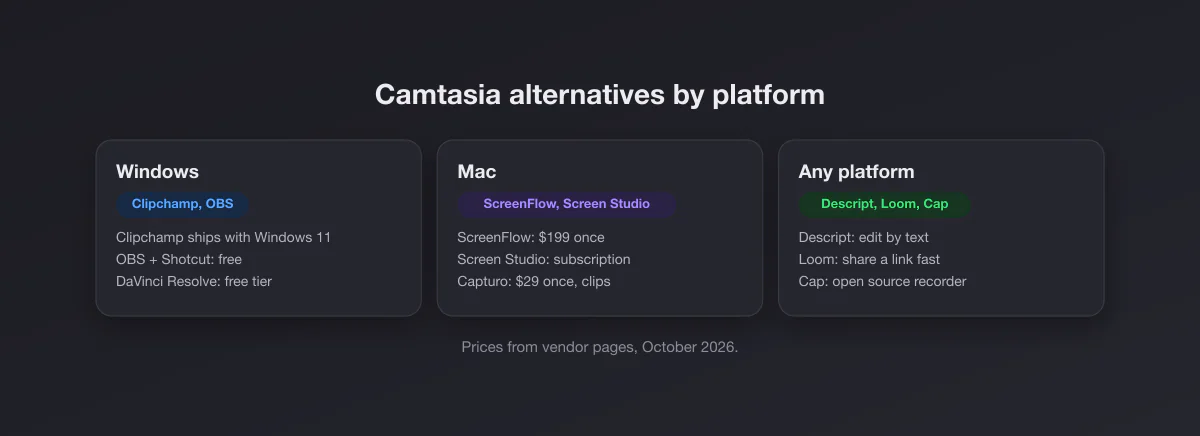
On Windows, the free pair is OBS Studio to record and Clipchamp (already in Windows 11) or DaVinci Resolve to edit. On the Mac, ScreenFlow is the closest one-time-purchase equivalent to Camtasia at $199. If you edit by reading a transcript rather than a timeline, Descript. If your videos are quick messages for a team, Loom. If they are short polished clips on a Mac, Screen Studio or our own app, Capturo.
If you build training courses with quizzes, callouts, cursor effects and a big asset library, and you work in a team that shares Camtasia projects, stay on Camtasia. Nothing free does that whole package as smoothly.
What Camtasia costs in 2026
TechSmith sells Camtasia to individuals as annual subscriptions in four tiers. (Prices from techsmith.com/store/camtasia, checked October 2026.)
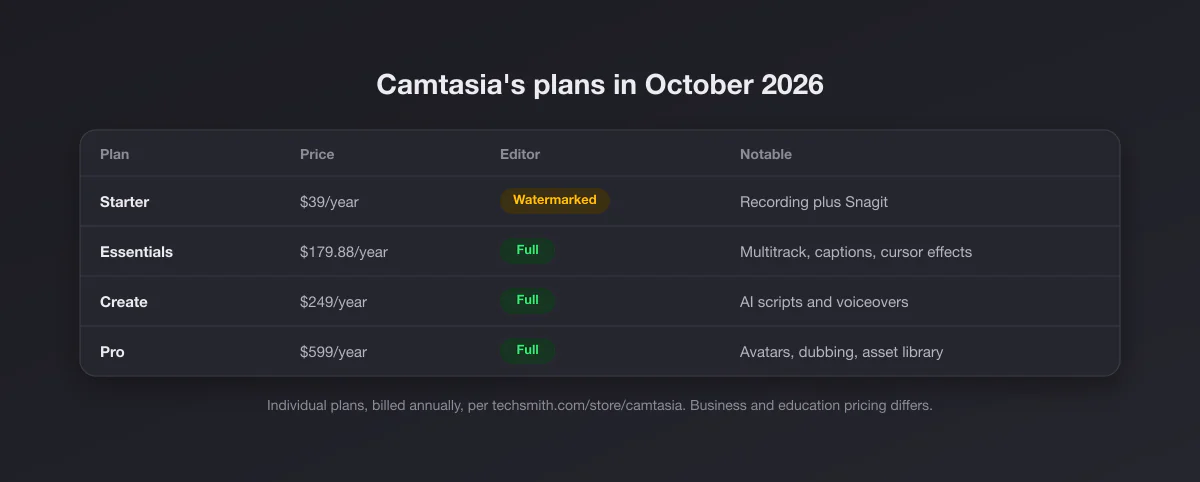
- Starter, $39 a year: recording with AI blur, noise removal and background removal, plus Snagit. The Camtasia Editor in this tier exports with a watermark.
- Essentials, $179.88 a year: the full editor with multitrack editing, text-based editing, captions, cursor effects and animations, plus Audiate and Snagit.
- Create, $249 a year: adds AI script writing and more than 200 voiceover voices.
- Pro, $599 a year: adds avatars, translation and dubbing, and a large royalty-free asset library.
Camtasia runs on Windows 10 (20H2 or later) and macOS 14 or later, with nearly identical features on both, and each license covers two devices for the same person. The free download includes every editing feature but watermarks exports. The practical floor for watermark-free editing is Essentials, so the realistic comparison is about $180 a year.
Split the job: recording versus editing
Camtasia bundles two tools. Recording the screen is close to a solved problem, and free tools do it well on both platforms. Editing is where the value and the price sit. Ask which half you actually use:
- Mostly recording, light trimming: you are paying for an editor you barely open. A free recorder and a simple trimmer cover it.
- Real editing: cuts, zooms, callouts, captions, music. You need a proper editor, and the question becomes free (Resolve, Shotcut, Clipchamp) versus paid (ScreenFlow, Descript, Camtasia).
- Interactive training: quizzes and LMS output. This is Camtasia's home ground.
The alternatives at a glance
| Tool | Price (Oct 2026) | Platforms | Records | Edits | Best for |
|---|---|---|---|---|---|
| Camtasia | $39 to $599 a year | Windows, Mac | Yes | Full timeline | Training videos and courses |
| OBS Studio | Free | Windows, Mac, Linux | Yes, very flexible | No | Recording anything |
| Clipchamp | Free to 1080p, 4K with Microsoft 365 | Windows 11, browser | Yes | Simple timeline | Quick edits on Windows |
| DaVinci Resolve | Free, Studio $295 once | Windows, Mac, Linux | No | Professional | Serious editing for free |
| Shotcut | Free | Windows, Mac, Linux | No (screen via OBS) | Timeline | Lightweight free editor |
| ScreenFlow | $199 once | Mac | Yes | Full timeline | Camtasia replacement on Mac |
| Descript | Free tier, paid from about $16/mo | Windows, Mac | Yes | By transcript | Talking-head and tutorial edits |
| Loom | Free (25 videos, 5 min), Business ~$15/user/mo | Windows, Mac, Chrome | Yes | Basic trims | Async team updates |
| Screen Studio | $9/mo billed yearly | Mac | Yes | Auto zoom editor | Polished product demos |
| Capturo (ours) | $29 once | Mac | Yes, with system audio and webcam bubble | No timeline | Short framed clips |
Prices are vendor list prices in October 2026. Descript's plan prices vary by billing period, so check its current price.
On Windows
OBS Studio plus an editor (free)
OBS records the screen, a window, the webcam and the system audio as separate sources, at whatever quality you set, with no watermark and no time limit. It has no editor, so pair it with one of the two below. The learning curve is the cost: scenes, sources and output settings take an afternoon to understand. Once set up, it is the most capable recorder on this page.
Clipchamp (free, already installed)
Clipchamp ships with Windows 11 and also runs in the browser. The free plan exports up to 1080p without a watermark and includes a screen, camera and voice recorder, which makes it the shortest path from "I need to record and trim a tutorial" to a finished file. 4K export comes with Microsoft 365 Personal and Family. It is a simpler timeline than Camtasia, with no cursor effects to speak of, but it covers the trim, title, music and export loop.
DaVinci Resolve or Shotcut (free editors)
DaVinci Resolve's free version handles Ultra HD at up to 60 fps and is a genuine professional editor; Studio is a one-time $295. It is overkill for a two-minute tutorial and heavy on older laptops. Shotcut is lighter, free and open source, and good enough for cuts, zooms and text.
Taking the screenshots for your tutorial on Windows? Our guide to every Windows screenshot method covers the Snipping Tool, which also records short video on Windows 11.
On the Mac
ScreenFlow ($199 once)
ScreenFlow 10 is the closest thing to Camtasia on the Mac: record screen, camera and audio, then edit on a timeline with callouts, zooms, annotations and captions. It is a one-time $199, with an optional stock media library at $99 a year. It is Mac only, and supports macOS Sonoma and Sequoia. Over two years it costs less than Camtasia Essentials; over three it costs much less.
Screen Studio (subscription)
For product demos where you want the video to look designed without editing it, Screen Studio adds automatic zoom on clicks and smooths the cursor. It costs $29 a month or $9 a month billed yearly, and is Mac only. It is not a course editor: no quizzes, little control over a long multi-clip timeline.
Capturo, our app, for short clips
Disclosure: ours. Capturo is a 2 MB native Mac app that records the screen or an area with system audio, composed live over a gradient background with rounded corners, with ⇧⌘9. Settings add an optional webcam bubble, microphone (macOS 15+) and auto-zoom on clicks (beta). Recordings are MP4; GIFs come from a recording: Convert Video to GIF makes a 12 fps, 960 px wide GIF from clips up to 45 seconds. It also annotates screenshots with arrows, text and blur. $29 once, 30-day refund, macOS 14 or later.
Be clear about the limits: Capturo has no timeline editor, no captions, no cursor effects, no quizzes and no Windows version, and its auto zoom is a beta you cannot adjust afterwards. It does not replace Camtasia for a course. It replaces Camtasia for the person who opened a full video suite to record a 20 second clip for a bug report, a changelog or a support reply. Download for Mac. If zoom and polish are the point, compare the Screen Studio alternatives.
The built-in recorder
macOS records the screen for free with ⇧⌘5, with a timer and microphone input, and QuickTime can trim the result. Capturing the Mac's own audio needs macOS 27 or later (the "Include System Audio" option, per Apple's support article of September 14, 2026); on macOS 26 and earlier it records the microphone only. Our QuickTime screen recording guide walks through it, and the best screen recorder for Mac roundup compares every recorder on audio and price.
On any platform
Descript
Descript records the screen and edits video by editing the transcript: delete a sentence in the text and it disappears from the video, filler words included. For tutorials that are mostly someone talking over a screen, that is faster than a timeline. The free plan includes 60 media minutes a month; paid plans start around $16 a month and add watermark-free export and more AI credits.
Loom
If your Camtasia videos are really messages to colleagues, Loom is the better fit: record, and a link is on the clipboard. The free plan allows 25 videos of up to 5 minutes; Business is $18 per user per month. Editing is minimal by design.
Which one, by situation
| You… | Take |
|---|---|
| Build courses with quizzes, callouts and a team workflow | Camtasia |
| Are on Windows and want free | OBS plus Clipchamp, or Clipchamp alone |
| Want a professional editor without paying | DaVinci Resolve |
| Are on a Mac and want a one-time Camtasia equivalent | ScreenFlow |
| Mostly talk over a screen and hate timelines | Descript |
| Send updates to a team | Loom |
| Make polished product demos on a Mac | Screen Studio |
| Record short framed clips on a Mac | Capturo |
What you lose by leaving Camtasia
To be fair to Camtasia, a few things are hard to rebuild from free parts. Cursor effects (highlight, magnify, click rings) applied after recording, because Camtasia records cursor data separately from the video. Quizzes and interactive output for learning platforms. Templates and themes shared across a team so every video matches. And the convenience of recording, editing and Snagit screenshots from one vendor on both Windows and Mac. If two or more of those are part of your weekly work, the subscription is buying something real, and the right answer is to stay and pick the cheapest tier that covers them.
The money, over three years
Camtasia Essentials over three years is about $540. ScreenFlow is $199 once. DaVinci Resolve Studio is $295 once, and its free version may be all you need. OBS, Shotcut and Clipchamp's free plan cost nothing. Screen Studio on yearly billing is $324. Capturo is $29. None of these is the same product as Camtasia, which is the point: you are paying for the parts you use, not the suite.
Moving off Camtasia
Camtasia project files (.tscproj) do not open in other editors. Before your subscription lapses, export finished videos as MP4 and keep the raw recordings (.trec) of anything you might re-edit; you can produce MP4s from them while you still have access. Media you imported (music, images) lives outside the project and stays usable anywhere.
For the stills in your tutorials, the screenshots between video segments, our free screenshot beautifier adds padding, a background and rounded corners in the browser, which gives the same framed look as a styled recording.